

Question

First-time app rejected -> Fixed metadata & subs, but now subs "Waiting for Review" and can't attach to new app version

  • February 12, 2026
  • 1 reply
  • 0 views

Forum|alt.badge.img

Hi everybody,

iOS dev here with my first App Store submission (hard-paywall screen time app). Initial rejection was for 3 issues I fixed (all metadata related like missing Privacy & TOS link in app description).


Anyway, the main subscription problem:

  • My 2 desired subs were originally "Developer Action Needed" (apparently because the generic "Premium access" name was rejected)

  • So, I fixed names -> "ThirstTrapp Annual Access" + "ThirstTrapp Weekly Access"

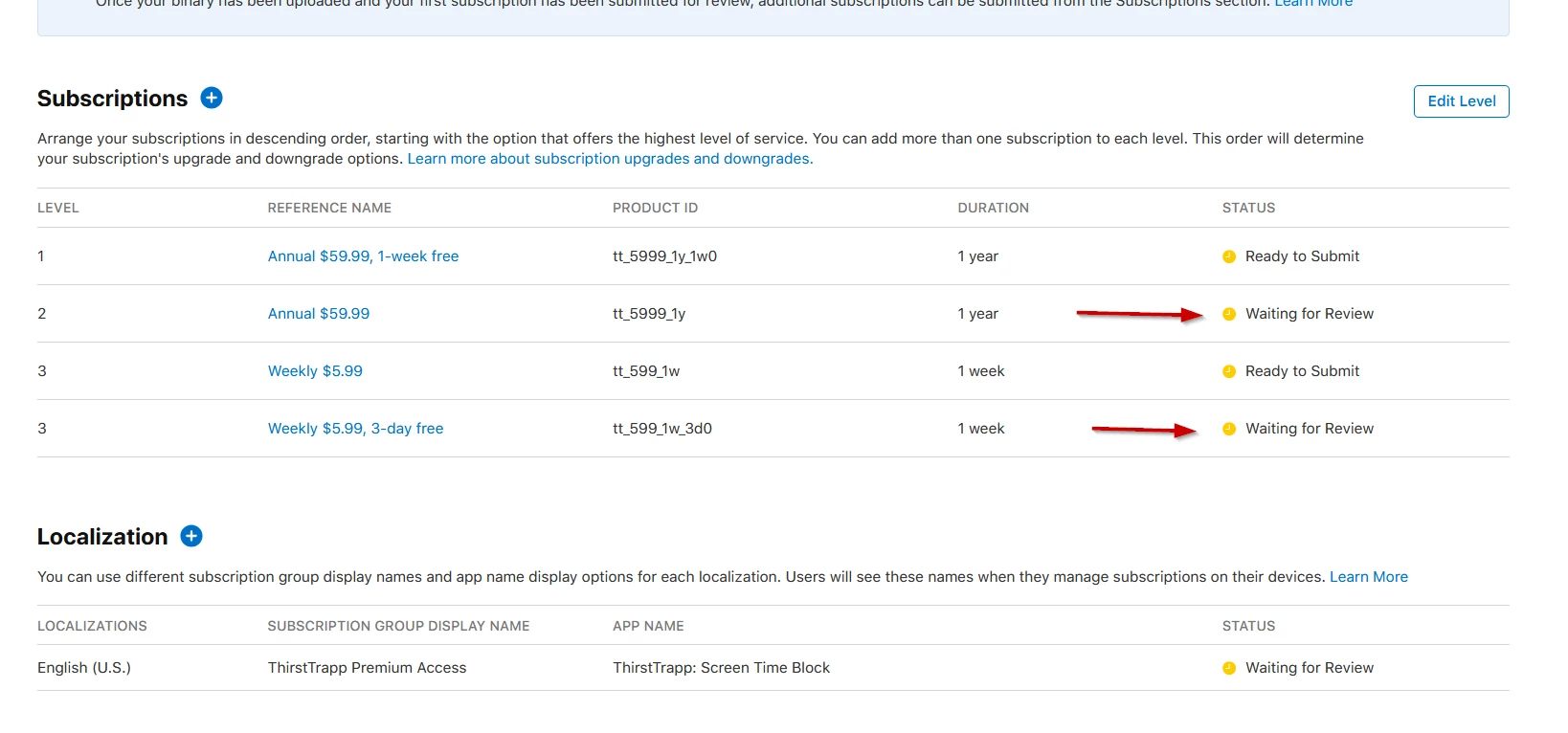
  • Now both are "Waiting for Review" after I saved them from Subscriptions page


Current blocker:
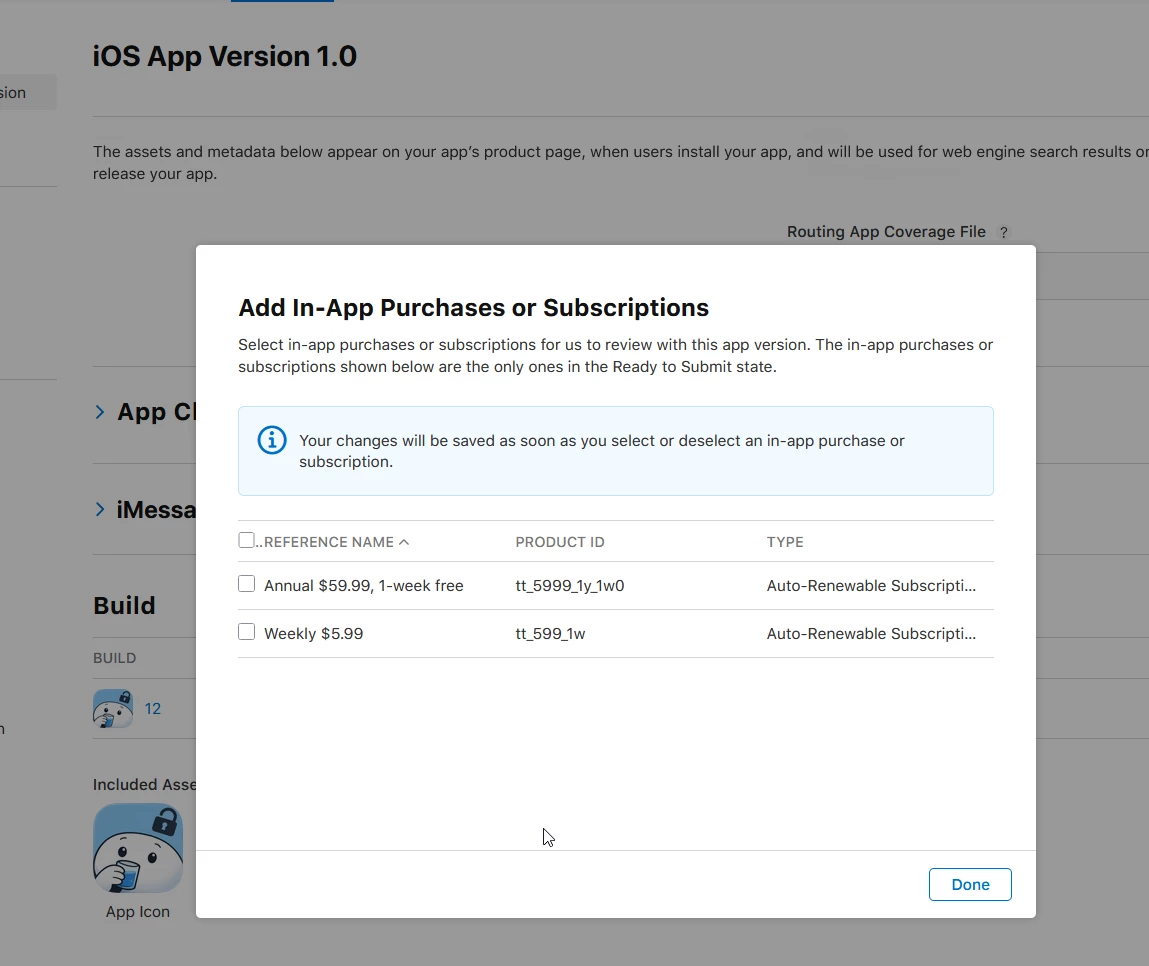
When creating new app build (with fixed metadata) -> try to add "In-App Purchases and Subscriptions":

  • Dialog only shows my 2 older "Ready to Submit" subs (not the 2 new ones I actually want)

  • Can't attach the "Waiting for Review" ones = can't submit app with correct subs


Screenshots of the issue:

[Subscriptions page - desired ones stuck "Waiting for Review"]

[App version IAP dialog - only shows old subs]


What I've tried:

  • Waited 2+ hours, refreshed, different browsers

  • New build uploaded


Questions:

  1. Does “Waiting for Review” for subscriptions mean they are already in review with Apple? Without me having to explicitly “send” it to them or press a button? Without them being submitted together with an app? So should I just wait it out for the subs to change to a status that I can then submit my app with?


Thanks for any advice! First launch nerves + this workflow is confusing.

 

1 reply

Tarek
RevenueCat Staff
Forum|alt.badge.img+3
  • RevenueCat Staff
  • February 12, 2026

Hey,
 
Thank you for reaching out. I'm Tarek, from the support team, and I'll happily assist you.


I can see that your App Store products are all currently waiting for review.
 
Could you please tell me if you submitted those products along when submitting your main app for review or if you submitted them separately?
 
If you've submitted them separately, Apple reviewers won't be able to test them and as a consequence will reject both the app and the products.
 
You also won't be able to test your purchases if your products are in the waiting for review state.
 
When you're ready to submit your app, you should make sure you attach in-app purchases and subscription for them to be reviewed and approved together.
 
?name=image.png
 
Please note that this section will only appear if you have subscriptions in the ready to submit state.
 
Unfortunately, since your subscriptions are already in review and Apple doesn't let you change their status, you can either wait for them to be rejected, which could take several days, or you can recreate them which is what we recommend.
 
You can create new subscriptions copying the details you had before, but changing the unique identifiers. Then you can add them back to RevenueCat and start using those from now on.
 
I'm sorry that this process is so involved and messy, but it's outside of our control and a limitation from Apple.
 
As a final note, please ensure that:
 

  • You keep your products in the ready to submit state while you're making sandbox test purchases
  • You submit both your app and your subscriptions when you're ready to go to production.
  • You should also make sure that you have accepted all business agreements both in App Store Connect and in your Developer Portal, and that your banking information is valid.

 
Once all of this is correctly configured, this should work as your RevenueCat configuration seems right. 


I hope this is useful.
 
Please do not hesitate to reach out if I can help you further.
 
Best regards,


