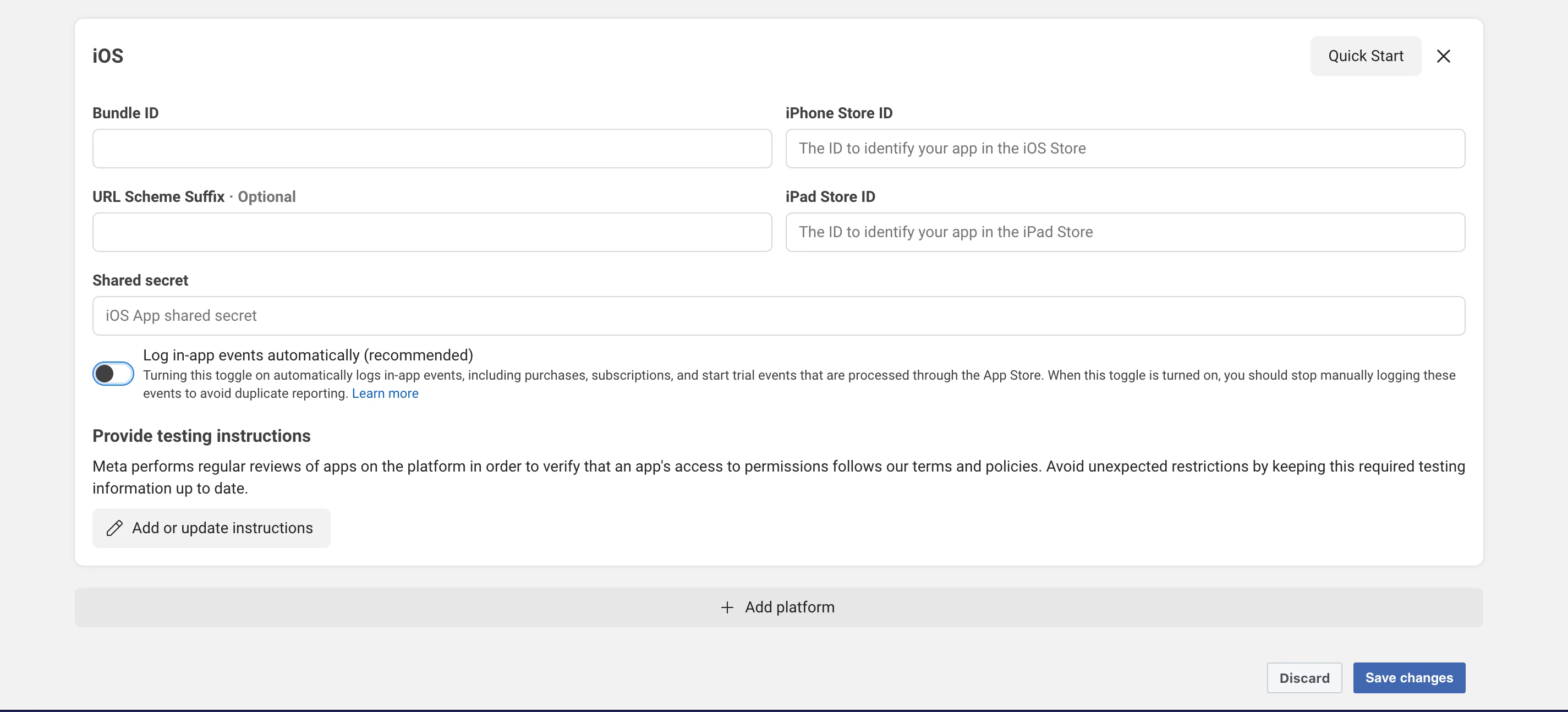
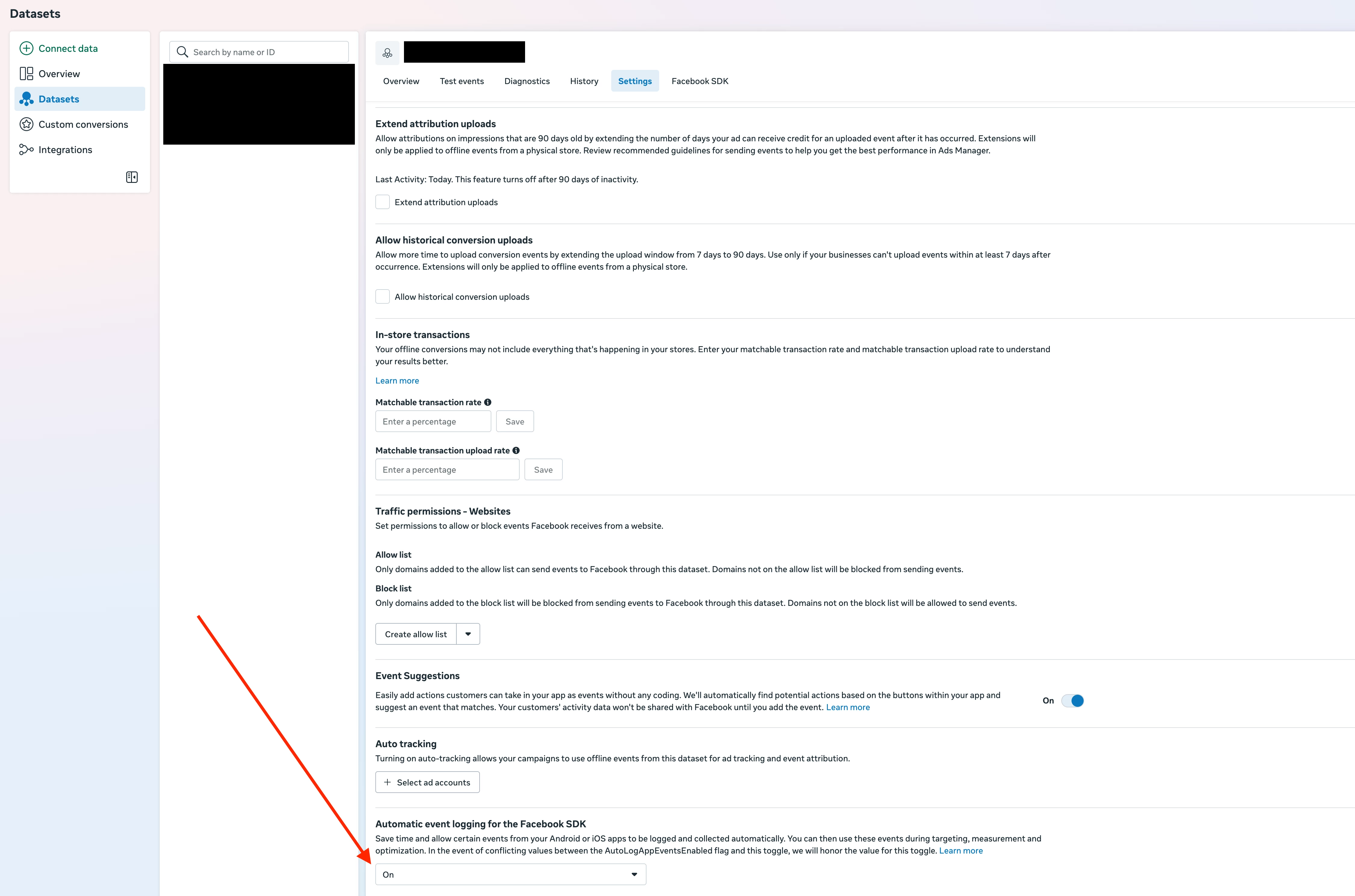
When certain settings are disabled to prevent double counting (double spending), install and usage events also stop working. This seems to be caused by disabling options on the Datasets page. Additionally, parts of the documentation appear outdated and need revision.
There are inconsistencies between the configurations available in Meta Apps / Meta Events Manager and the current RevenueCat documentation.
Tech Stack
-
React Native (Expo)
-
react-native-fbsdk-next -
react-native-purchases
Relevant Documentation
From RevenueCat docs:
https://www.revenuecat.com/docs/integrations/attribution/meta-ads#setting-device-attributes
Remove Meta SDK Purchase Tracking
Make sure to remove all client-side tracking of revenue. Since RevenueCat sends events for all revenue actions, tracking purchases directly with the Meta SDK can lead to double counting in Meta Ads Manager.You can disable automatic In-App Purchase event logging from the Meta SDK or from your Meta app dashboard:
Settings > Platform > Log In-App Events Automatically > NoTo continue tracking install and usage events in Meta, follow the next steps.
Issues Encountered
-
Platform Configuration Limitation
This setting does not apply to Meta apps that have not yet activated an iOS or Android platform. During development, there is no available configuration unless a platform is added.
While Meta allows adding platforms for unreleased apps, this requirement is not clearly explained in the documentation. -
Conflicting Dataset Setting
In Meta Events Manager → Datasets, there is another option:Automatic event logging for the Facebook SDK
Allows events from Android/iOS apps to be logged automatically.
If there is a conflict between theAutoLogAppEventsEnabledflag and this toggle, this setting takes precedence.It is unclear whether this setting should be enabled or disabled.
-
Documentation Inconsistency
The documentation instructs disabling:-
“Log in-app events automatically”
However, disabling this appears to also stop install and usage tracking, which contradicts the stated goal.
-
Current Implementation
In my React Native codebase:
-
Disabled automatic event logging:
setAutoLogAppEventsEnabled(false);
-
Configured RevenueCat:
if (Platform.OS === "ios") {
  Purchases.configure({ apiKey: iosApiKey });
} else if (Platform.OS === "android") {
  Purchases.configure({ apiKey: androidApiKey });
}

// Automatically collect the $idfa, $idfv, and $ip values
Purchases.collectDeviceIdentifiers();

// REQUIRED: Set the Facebook anonymous ID
const anonymousId = await AppEventsLogger.getAnonymousID();
Purchases.setFBAnonymousID(anonymousId);
Note: The current RevenueCat documentation does not reference the react-native-fbsdk-next package, which also appears outdated.
Summary
-
My in-app purchase flow works correctly on the RevenueCat side.
-
Events are visible in Meta Events Manager.
-
However, the guidance on preventing double counting is unclear and outdated due to changes on the Meta side.
Request
Could someone please:
-
Review and update the documentation
-
Provide a clear, step-by-step integration guide
-
Clarify which settings should be enabled vs disabled, especially in:
-
Meta App settings
-
Events Manager → Datasets
-
-
Include up-to-date React Native examples, ideally using the latest versions of the relevant packages
Overall, the integration documentation would benefit from a complete rewrite to reflect the current Meta platform behavior.