Question

apple store keep rejecting app store localization

  • January 9, 2026
  • 4 replies
  • 34 views

Forum|alt.badge.img

Hi,

Just wondered if anyone else has had similar problems to this?


Its a new app and so as far as I understand, when I make a change/try to fix monetisation i must resubmit a new binary with it as well.


Problem is they keep rejecting the monetisation side of things. 

specically App Store Localization. (I see a rejected status next to each Localisation) 

My app is available for europe and the us. 


Ive provided Localization for UK and US.


I dont get any feedback from the reviews to tell me what the problem is.


Anyone else had this before?


Thanks 

 

4 replies

alejandra-wetsch
RevenueCat Staff
Forum|alt.badge.img+6

Hey ​@mrmack-a72a32

Thank you for reaching out!

When you get Localization rejections, it often means there’s an issue with the subscription / IAP metadata, most commonly:

  • Missing or inconsistent localization fields (title/description not filled correctly)

  • Localization not matching the storefronts you’re distributing to

If the app is available across Europe or other parts of the world, excluding the US and UK, Apple may expect localizations that match those storefront languages/regions, or at least a default localization that correctly applies everywhere. Could you please share screenshots of your current product configuration, showing how it is localized, as well as your product availability?

Unfortunately, Apple’s subscription/IAP review feedback is often minimal or generic in App Store Connect. The best way to get a concrete answer from them is to reply to the reviewer and ask them to specify what’s wrong with the localizations.

Best,


Forum|alt.badge.img
  • Author
  • New Member
  • January 13, 2026

Yeah sure, this is what they currently look like (see screen shots).

The app is available across US and Europe.

From Revenue Cat everthing looks setup correctly. I get 

Apple Server to Server Notifications configured correctly,

Both my v8’s are down as valid credentials


Forum|alt.badge.img
  • Author
  • New Member
  • January 15, 2026

Also the prod build fails in review because the pay wall shows error 23

I see the rc error…
“Your products are configured in RevenueCat but aren't approved in App Store Connect yet. This prevents users from making purchases in production. Please ensure all products are approved and available for sale in App Store Connect”.


But my guess is that the store monetization localisation needs approved by apple and then error 23 is likely to go away.


Its all very chicken and egg


alejandra-wetsch
RevenueCat Staff
Forum|alt.badge.img+6

Hey ​@mrmack-a72a32

Thank you for providing screenshots of your product configuration in App Store Connect!

To provide additional details, this message you’re getting: “Your products are configured in RevenueCat but aren't approved in App Store Connect yet. This prevents users from making purchases in production. Please ensure all products are approved and available for sale in App Store Connect” is just a warning the SDK displays so that developers are aware that their products are still not approved to use in Production, so there’s nothing to worry about this at this point.

Regarding Apple review rejection, could you please confirm the following:

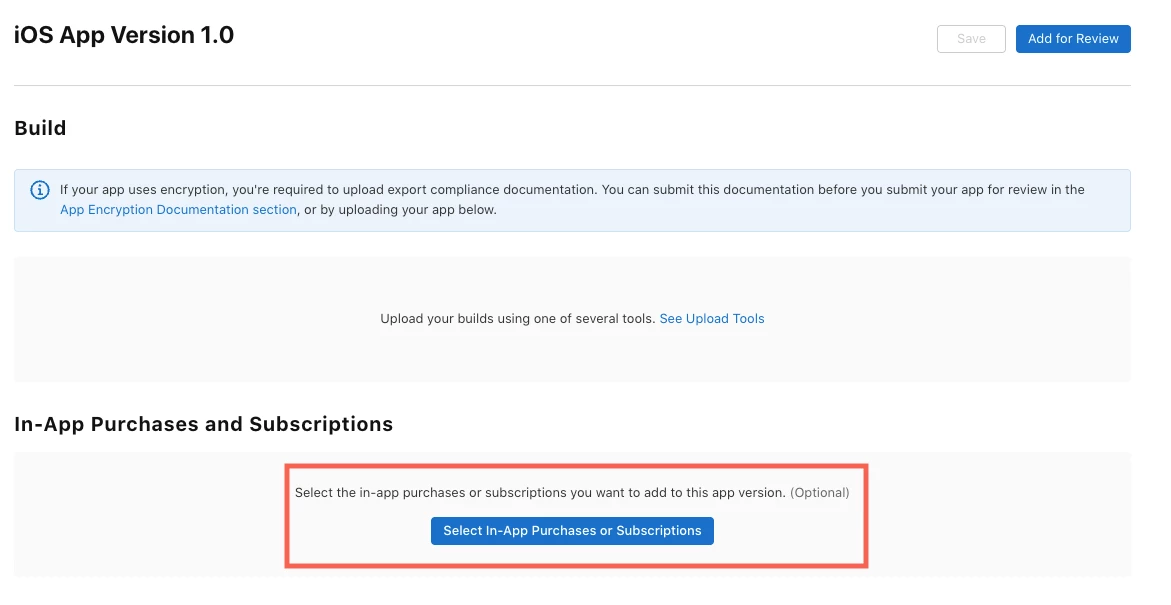
  • You have submitted your products together with your iOS build by selecting them on the Distribution screen of App Store Connect, as shown below


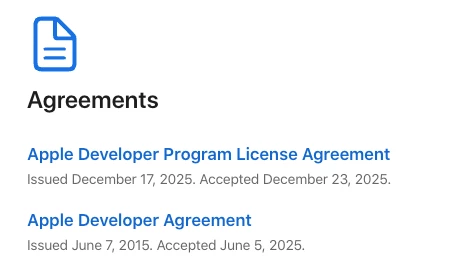
  • All your App Store Connect Agreements are accepted and are in an Active State
    • This can be found under the Business Menu of the App Store Connect: https://appstoreconnect.apple.com/business
  • Banking and Tax information are filled, and are in an Active State
    • This can be found under the Business Menu of the App Store Connect: https://appstoreconnect.apple.com/business
  • Apple Developer Agreements are accepted

After confirming that all the points above are in place, something that has helped other developers is to reply to the Apple reviewer and submit a screen recording that shows how your purchase flow works in your Sandbox environment. All the following elements must be shown: 

  • The moment you open your Paywall
  • Subscription options are displaying correctly
  • Selecting one of them and making a purchase
  • Showing that the Payment sheet appears
  • Confirming the purchase and showing that it succeeded
  • Showing the unlocked state could help as well

I hope this helps and that your app gets approved soon!