

Question

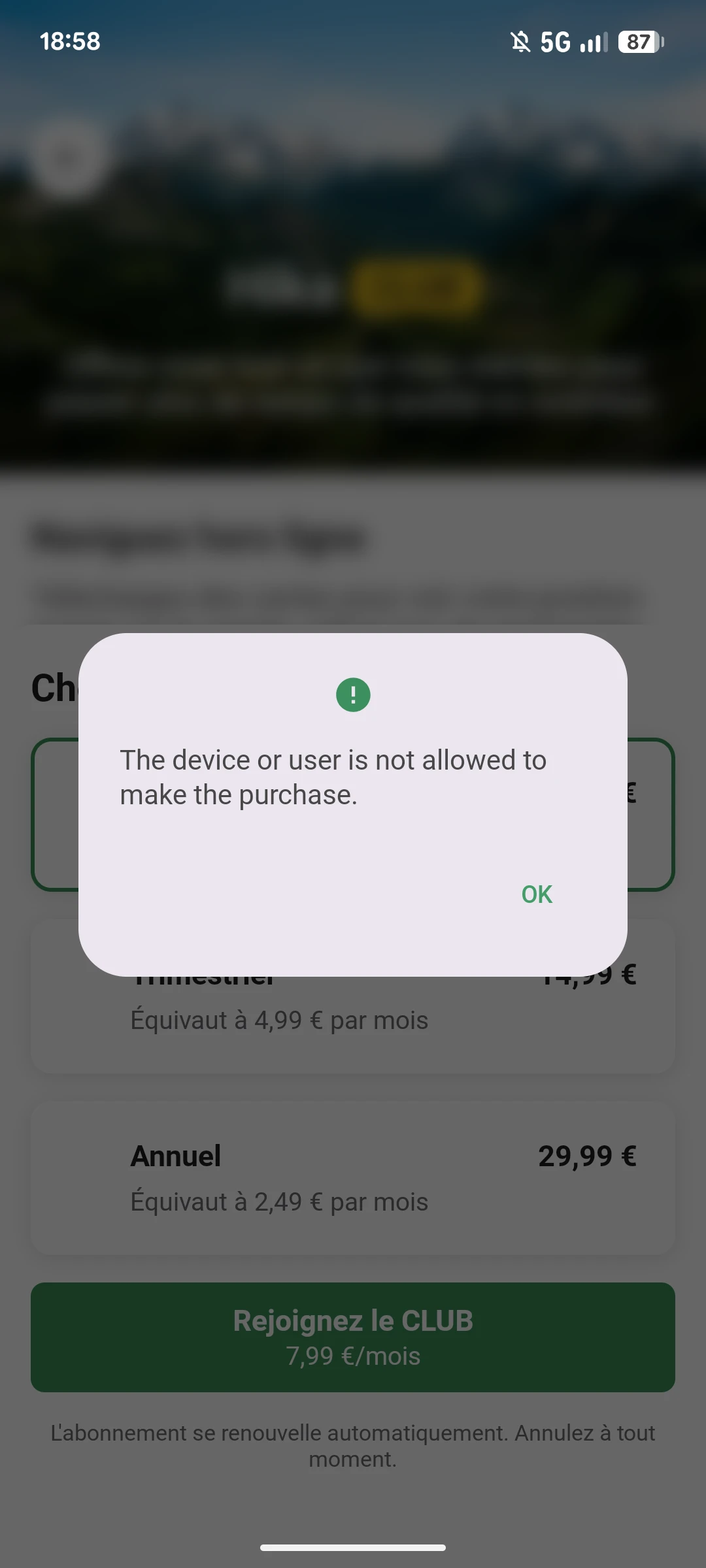
Translated Paywall Error Dialog

  • Nov 18, 2026 6:12 PM UTC
  • 1 reply
  • 6 views

Forum|alt.badge.img+1

Hello,

We would like to migrate our custom subscription integration to Revenuecat Paywall, but our main blocker is related to error dialog: they are currently untranslated. As a French focus market it’s not great to have an English error dialog. As a temporary solution, having the option to not have the SDK dialog could be great, so we can at least show our own dialog with translated texts. 


Thanks for your help!
 

1 reply

guilherme
RevenueCat Staff
Forum|alt.badge.img+6
  • RevenueCat Staff
  • Nov 18, 2026 10:56 PM UTC

Hey ​@Lucien , thanks for reaching out!

The dialog shown when a purchase (or restore) fails on our Paywalls uses the error message from our SDK, which today is only available in English. There's also no option yet to turn it off or replace it with your own though - the onPurchaseError callback on the PaywallListener lets you react to the failure, but our dialog still shows on top.

What you can do instead, is that in the meantime you can intercept the purchase before it starts, run it from your side, and show your own translated dialog if it fails. On Android, that's the onPurchasePackageInitiated method on the PaywallListener:

The purchase flow will pause until you call the resume action. If you call resume(false), the purchase will be cancelled. If you call resume(true), the purchase will proceed as normal.

more context here: Intercepting an initiated purchase


Calling resume(false) and then making the purchase yourself would look something like this:

override fun onPurchasePackageInitiated(rcPackage: Package, resume: Resumable) {
// Cancels the paywall's own purchase, so its dialog never shows
resume(false)

Purchases.sharedInstance.purchaseWith(
PurchaseParams.Builder(activity, rcPackage).build(),
onError = { error, userCancelled ->
if (!userCancelled) showYourTranslatedDialog(error.code)
},
onSuccess = { _, _ ->
closeYourPaywall()
},
)
}


From there, you can map error.code to your own French copy. Since the purchase then runs on your side, the paywall won't close on its own after it succeeds, so you'd dismiss it yourself in onSuccess !

Restores work the same way, with onRestoreInitiated and Purchases.sharedInstance.restorePurchasesWith(), and if you also have an iOS counterpart to your app, the same approach applies with the onPurchaseInitiated and onRestoreInitiated view modifiers, since the alert there is in English too.

This is something the team is aware of, and looking to improve in the future, but unfortunately we don’t have an ETA we can share for it!

Hopefully the workaround works for your use case for the moment, but do let me know how it goes in your testing.