Recently, we upgraded both our libraries (purchases and purchases-ui) to version 9.0.0 because Google Play required apps to use Play Billing Library (PBL) version 8 or later.
Before that we had no issues with our app, purchases worked fine in locall and production enviroment.
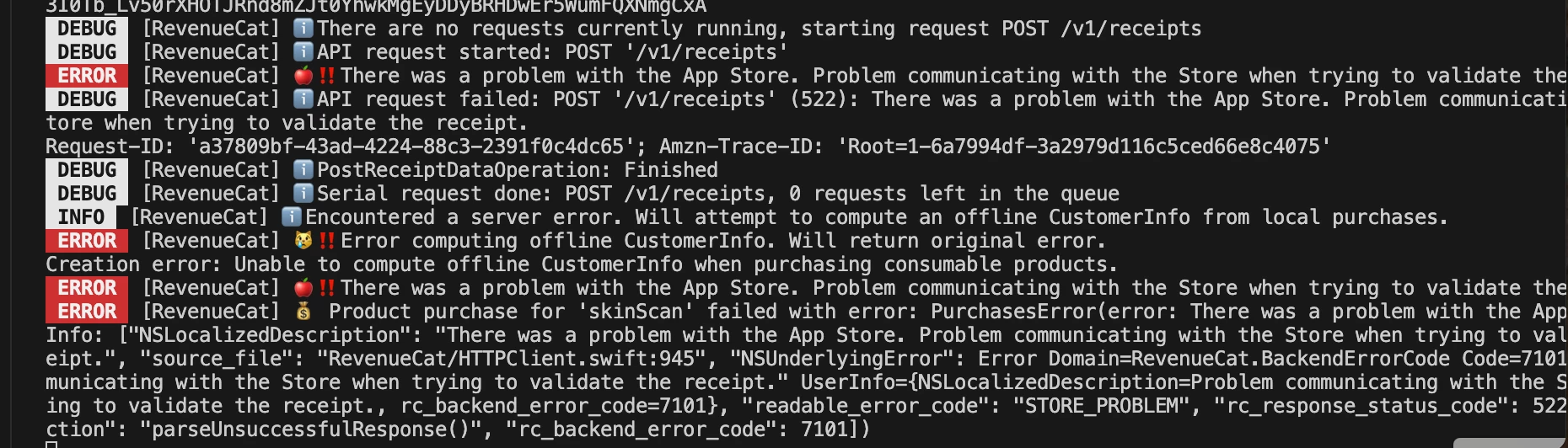
A few days ago a user issued an email to us that he tried to make a purchase of our one time package(‘consumable’). In revenue cat we saw that he was charged but the item in our app was still locked (indicating the payment wasnt successfull). I tried to trace where was the issue, but i couldnt find out. Today for the first time i replicated the issue and i made the same one time purchase in my local enivorment (sanbox), it registered the payment in revenue cat but i saw these error logs:
There was a problem with the App Store. Problem communicating with the Store when trying to validate the receipt.
The strange part is this issue happens at random times. After this unsuccessful payemnt i made, i tried a second time and every attempt after that was successfull. For now only one user had this issue in production, but it may escalate to more users.
The issue occurs on ios devices.
This is the data we recieve on the purchase (ive cleared all ids):
{
event: {
event_timestamp_ms: 1786367717255,
product_id: 'skinScan',
period_type: 'NORMAL',
purchased_at_ms: 1786367684000,
expiration_at_ms: null,
environment: 'SANDBOX',
entitlement_id: null,
entitlement_ids: null,
presented_offering_id: 'skinScan',
transaction_id: “exampleid',
original_transaction_id: 'exampleid',
is_family_share: false,
country_code: 'BG',
app_user_id: 'exampleid',
aliases: [
'exampleid',
'exampleid',
'exampleid'
],
original_app_user_id: 'exampleid',
currency: 'EUR',
price: 2.877,
price_in_purchased_currency: 2.49,
subscriber_attributes: { '$attConsentStatus': [Object], userId: [Object] },
store: 'APP_STORE',
takehome_percentage: 0.85,
offer_code: null,
tax_percentage: 0.145,
commission_percentage: 0.15,
metadata: null,
renewal_number: null,
discount_percentage: null,
discount_amount: null,
discount_identifier: null,
type: 'NON_RENEWING_PURCHASE',
id: 'exampleid',
app_id: 'exampleid'
},
api_version: '1.0'
}