## Summary
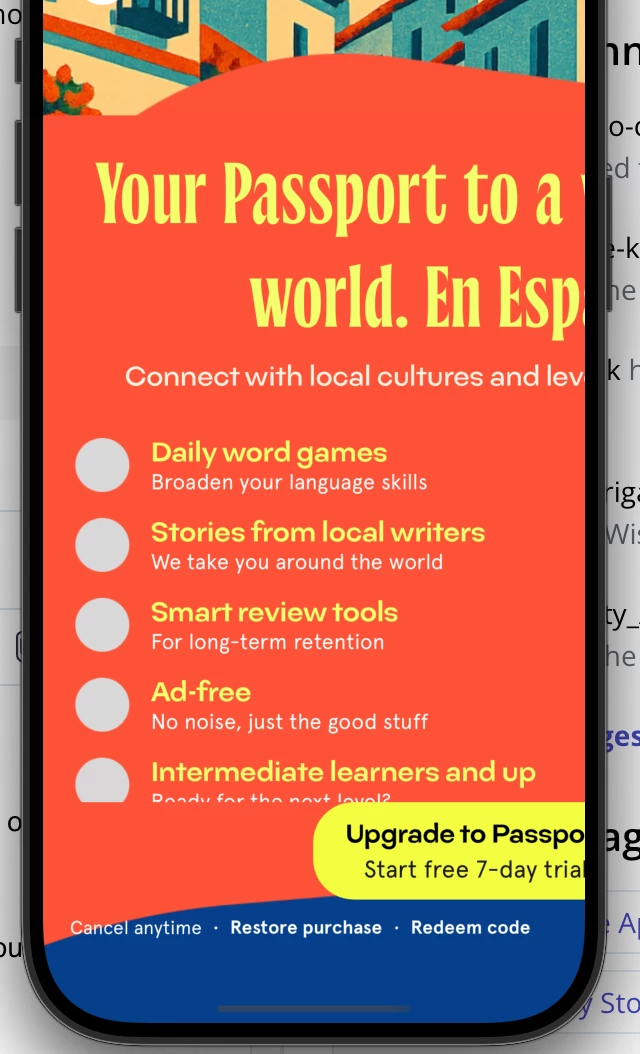
On iPhone (portrait), RevenueCat's `PaywallView` renders a wide/tablet layout (right-side truncation, overflow) for our custom paywalls. The same device renders your default template paywall correctly. This points to a sizing/constraints issue in the custom paywall runtime or size-class detection.
## Environment
- RC SDKs:
- purchases_flutter: 9.8.0 (also reproduced on 8.10.6)
- purchases_ui_flutter: 9.8.0 (also reproduced on 8.10.6)
## Expected vs Actual
- Expected: On iPhone portrait, `PaywallView` should use a compact/phone layout and fully respect the parent’s width; no horizontal overflow.
- Actual: The paywall renders a wide/tablet layout, appears left-aligned, extends past the right edge, truncating headline text and CTA.
## Minimal Repro (no app-specific wrappers)
We clamp the width to a phone-safe max and center it. The behavior persists even with a very small max width and no scroll views around it.
```dart
// Inside a page body
return SafeArea(
child: LayoutBuilder(
builder: (context, constraints) {
final width = constraints.maxWidth.clamp(0.0, 520.0); // tried 500–600
return Align(
alignment: Alignment.topCenter,
child: SizedBox(
width: width,
height: constraints.maxHeight,
child: PaywallView(
offering: foundOfferingFromPurchasesGetOfferings, // 'passport-main-paywall' or 'account-main-paywall'
onPurchaseCompleted: (_, __) {},
onPurchaseCancelled: () {},
onPurchaseError: (_) {},
onRestoreCompleted: (_) {},
),
),
);
},
),
);
```
## How we fetch the Offering
```dart
final offerings = await Purchases.getOfferings();
final found = offerings.all['passport-main-paywall'];
```
## What we already tried
- Removed any scroll views or extra wrappers that might relax constraints.
- Presented paywall embedded (in-tab) and also modally full-screen (still clamped) — overflow persists.
- Verified default RC template paywall renders correctly on the same device.
- Upgraded to latest 9.x RC SDKs (also reproduced on 8.10.6).
- Portrait vs landscape: issue reproduces in portrait; landscape also exhibits wide layout (as expected), but we care about portrait.
## Screenshots
- iPhone portrait shows truncated headline and CTA, right edge clipped (attach in forum post).
## Questions for the community
1. Has anyone seen `PaywallView` ignore compact width constraints on iPhone for custom paywalls while default templates behave?
2. Is there a known issue where size-class detection falls back to regular/tablet for custom templates embedded via `UiKitView`?
3. Is there a recommended way to force the phone/compact variant for custom paywalls?
4. Any best practices for designing custom paywalls to ensure they respect compact width in embedded contexts?
## Notes
- We only need embedded, in-tab behavior. The layout should honor compact width like the default template.
- Happy to share offering JSON or a screen recording if helpful.