
Question

ATT Consent Status for Stripe Purchases in Flutter

  • October 8, 2025
  • 5 replies
  • 77 views

Forum|alt.badge.img+2

Dear RevenueCat Community,

I am using the RevenueCat SDK in my Flutter application and have implemented App Tracking Transparency (ATT) on iOS, requesting the user’s permission before a purchase. When the user grants permission, I call Purchases.collectDeviceIdentifiers() to obtain device identifiers such as the IDFA.

In my Flutter app, users can purchase subscriptions via Stripe. For this, a web view is opened for the user to complete the payment. Once the purchase is completed and the user returns to the app, the app submits the subscription information to https://api.revenuecat.com/v1/receipts to upload the purchase to RevenueCat. This is how the user gains access to the app features after the purchase.

To receive purchase events centrally in my backend, I have added a webhook in RevenueCat that reports Initial Purchase and Renewal events to my endpoint.

I have observed the following behavior:

  • For in-app purchases (IAP), in the RevenueCat dashboard > Recent Transactions > Customer Detail, the ATT Consent status is correctly displayed in the customer attributes section as Denied if the user denied permission or Authorized if the user granted permission.

  • For Stripe purchases, in the RevenueCat dashboard > Recent Transactions > Customer Detail the, ATT Consent status in the customer attributes section appears gray, indicating no value has been set.

I understand that the ATT Consent status is automatically obtained by the Purchases SDK from the device. However, I would like to confirm if there are any limitations or specific configurations I should be aware of to have the ATT Consent status also available for Stripe purchases.

It’s strange that for users who purchase through in-app purchases, the ATT consent status is displayed, but for users who purchase via Stripe, it isn’t. In my app, I use the same logic to request ATT permission in both cases, so it doesn’t make sense that it works for one and not the other.
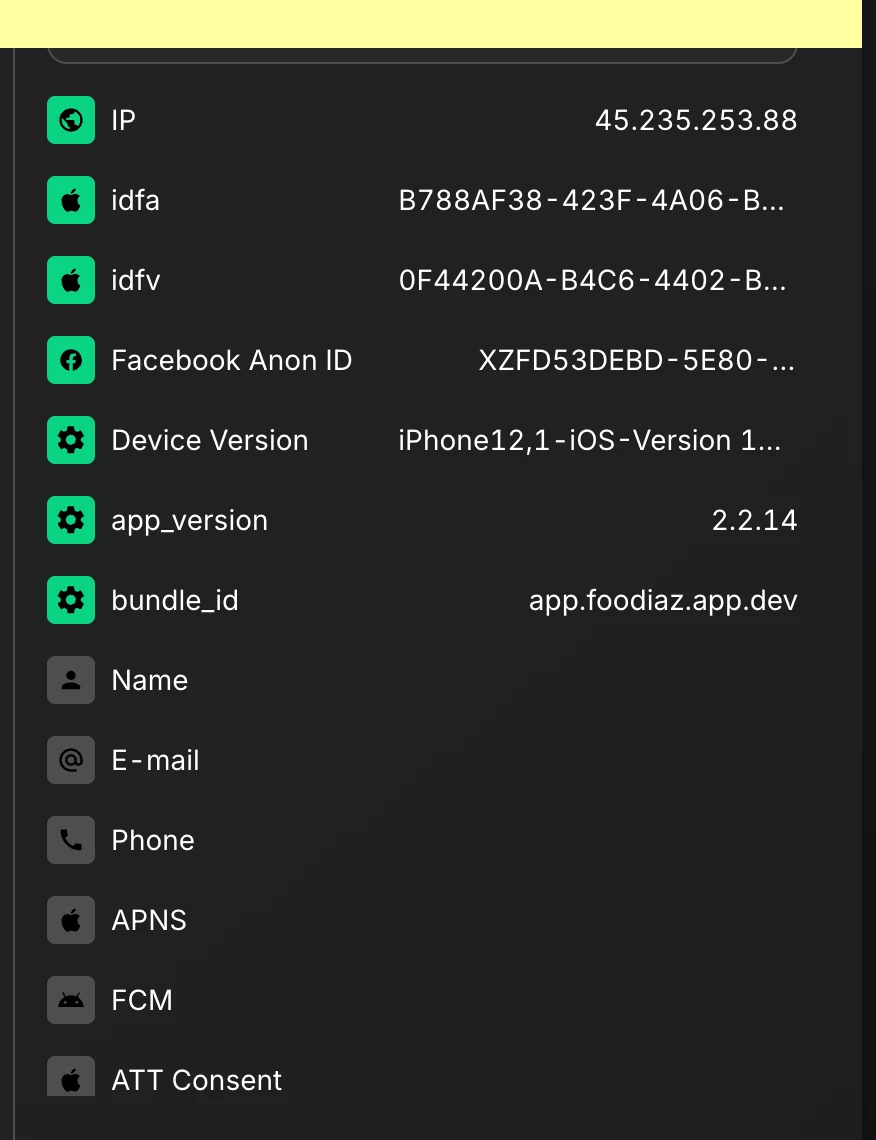
This image shows a customer who accepted the ATT permission in the app and make a purchase via Stripe. While we can see the IDFA value in the customer attributes, the ATT Consent status appears gray, when it should be displayed as Authorized.

Thank you in advance for your assistance and guidance.
 

Best regards,
Roberto Cruz

This post has been closed for comments

5 replies

jeffrey_bunn
RevenueCat Staff
Forum|alt.badge.img+6
  • RevenueCat Staff
  • October 10, 2025

Hi ​@roberto-cruz-ae4360! I think the issue here is around syncing the attributes/device identifiers to RevenueCat. Calling collectDeviceIdentifiers() sets the attributes client-side, but importantly, attributes are only synced with RevenueCat servers when Purchases.configure() is called, the app is backgrounded, and when purchases are made or restored.

For non-Stripe purchases, the pending attributes are sent along with the receipt after making a purchase. However, POSTing Stripe purchases bypasses the typical purchase/receipt flow, and I suspect these attributes are never being synced.

To get around this limitation, after collecting the device identifiers, call syncAttributesAndOfferingsIfNeeded() . This will force an attribute sync, then you can proceed with your Stripe purchase.

Can you let us know if this resolves the issue? Thanks!


Forum|alt.badge.img+2

Hello ​@jeffrey_bunn Thanks for you response.

I am already calling syncAttributesAndOfferingsIfNeeded() before a purchase (in-app/stripe) happens.
The flow is as follows:
App Started → Purchases.configure() is called → ATT consent pop up is displayed → user allow or deny the tracking permission → collectDeviceIdentifiers method is called → syncAttributesAndOfferingsIfNeeded() is called → paywall is shown → user chooses either in-app or Stripe → purchase is completed.

I also tried requesting the ATT consent before configuring the Purchases SDK, but I encountered the same issue: the IDFA is collected, but the ATT Consent status is not set.


chris_perriam
RevenueCat Staff
Forum|alt.badge.img+6
  • RevenueCat Staff
  • October 22, 2025

@roberto-cruz-ae4360 I’ve confirmed that our SDK is updating the $attConsentStatus attribute when it sends a receipt to our servers. This happens when a purchase is made, or when syncPurchases or restorePurchases is called.


The $attConsentStatus attribute is not set via the collectDeviceIdentifiers method being called.


To trigger an update to the $attConsentStatus, you may wish to perform a syncPurchases on first launch when the ATT prompt is shown. Alternatively, you may wish to set the attribute manually. If you wish to reference the logic our SDK uses to set this attribute, the relevant SDK source code file would be 
https://github.com/RevenueCat/purchases-ios/blob/main/Sources/Attribution/AttributionFetcher.swift
 

Let me know if there’s anything I can clarify further - happy to help!


Forum|alt.badge.img+2

@chris_perriam Thanks for following up on my question. I will try using the syncPurchases method to see if it works. Also, how can I manually set the $attConsentStatus? remember that I am using the RevenueCat SDK for Flutter


chris_perriam
RevenueCat Staff
Forum|alt.badge.img+6
  • RevenueCat Staff
  • October 30, 2025

@roberto-cruz-ae4360 you can manually set the $attConsentStatus to authorized in your Flutter app like so:

await Purchases.setAttributes({"\$attConsentStatus": "authorized"});
await Purchases.syncAttributesAndOfferingsIfNeeded();