
Question

Are app reviews done seperately to subscription reviews?

  • January 13, 2026
  • 4 replies
  • 79 views

max-church
Forum|alt.badge.img

Im extremely stuck on submitting my app to the app store.

I tried to submit my app to the app store - but it got rejected based on the paywall screen erroring.
Im using a custom screen.



I have a few questions.

Do I have to submit the app and the subscriptions together?

Surely this leads to a catch 22 - where the paywall screen will not ever serve the subscriptions since they are still in review…

Ive been waiting for my subscriptions to get reviewed now for like 4 days - I’m wondering if i need to submit the whole APP again for review - to get them to review the whole app again and therefore review the subscriptions (?).

If I use my prod revenue cat key - i get a similar error appearing…

@app/mobile:dev:  WARN  [RevenueCat] ⚠️ RevenueCat SDK is configured correctly, but contains some issues you might want to address

@app/mobile:dev: 

@app/mobile:dev: Warnings:

@app/mobile:dev:   • Your products are configured in RevenueCat but aren't approved in App Store Connect yet. This prevents users from making purchases in production. Please ensure all products are approved and available for sale in App Store Connect.

@app/mobile:dev:   • The offerings 'default', 'app' have configuration issues that may prevent users from seeing product options or making purchases.

@app/mobile:dev: 

@app/mobile:dev: Product Issues:

@app/mobile:dev:   ⏳ subscription_monthly (Monthly Subscription): Some process is ongoing and needs to be completed before using this product in production purchases, by Apple (state: WAITING_FOR_REVIEW). You can still make test purchases with the RevenueCat SDK, but you will need to wait for the state to change before you can make production purchases.

@app/mobile:dev:   ⏳ subscription_annually (Annual Subscription): Some process is ongoing and needs to be completed before using this product in production purchases, by Apple (state: WAITING_FOR_REVIEW). You can still make test purchases with the RevenueCat SDK, but you will need to wait for the state to change before you can make production purchases.


Or should i just wait for the subscriptions i have to exit this “Waiting for review” phase…

 

To note - my app - is currently NOT submitted for review… Im waiting for these to approve.

Ive seen quite a few posts on this in the forums, with some people thinking this is a catch 22 - But the responses have never seemed conclusive - some posts saying to just wait - other responses saying to submit your app.

Any help would be appreciated.

Thanks,
Max​​​​​​​

4 replies

matt-heaney
RevenueCat Staff
Forum|alt.badge.img
  • RevenueCat Staff
  • January 14, 2026

Hey ​@max-church!


Matt from RevenueCat here. Thanks for the question! This is an issue a lot of new apps run into.


Yes, your app and the subscriptions need to be reviewed together.


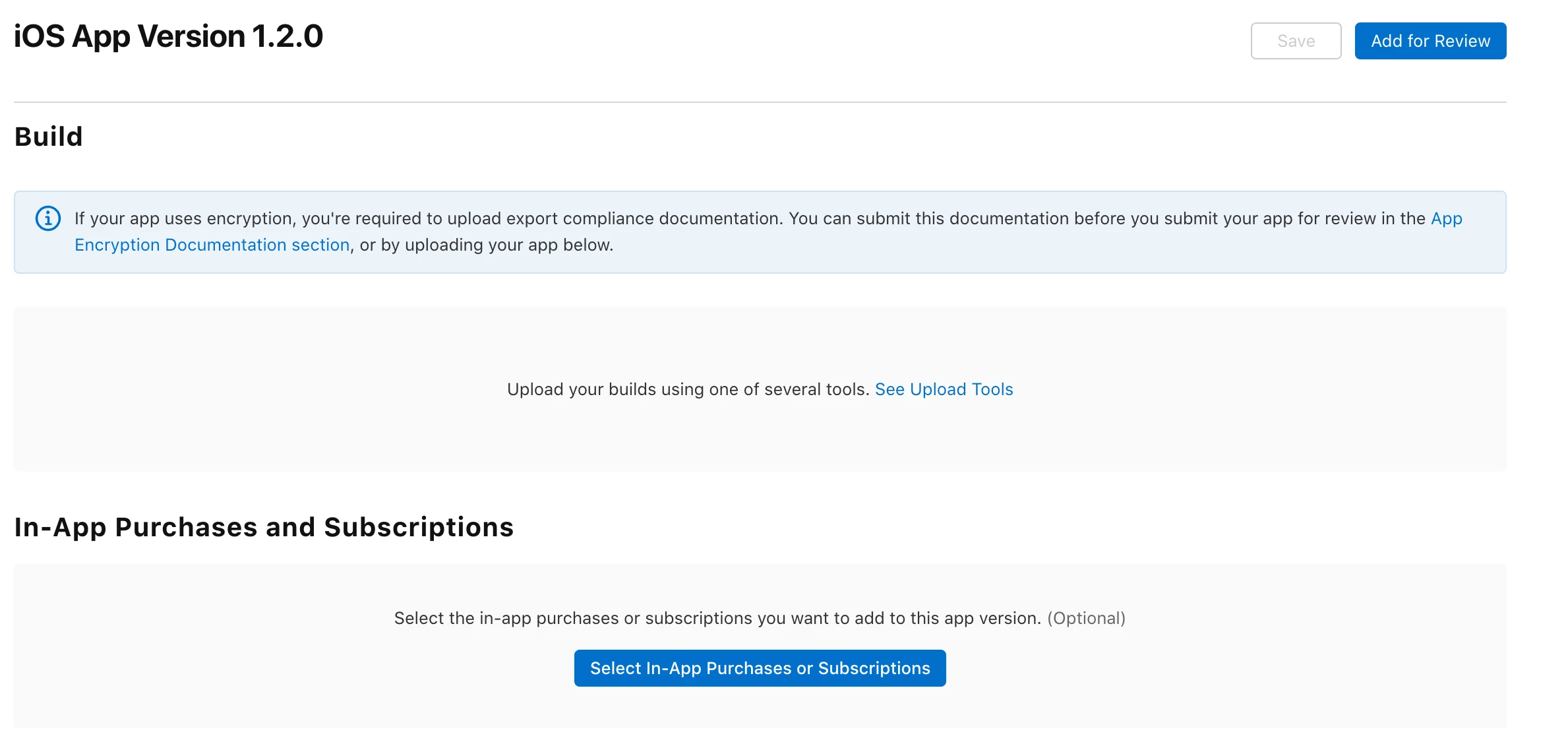
However, for a new app, this is handled with a slightly different approach. When you submit a new app, the subscriptions need to be attached. There’s a section under the app build where you can include your in-app purchases:


When Apple reviews your new app with subscriptions attached, they will be able to successfully fetch the subscription data before they are approved, avoiding the “catch-22” scenario you’ve identified.


Unfortunately, once a subscription is submitted separately, it cannot be withdrawn back into a “Ready to Submit” state until Apple manually rejects it.


From here, you’ll need to allow Apple to reject the subscriptions in review. The time required for this can vary. Alternatively, the app can be submitted again with different subscriptions attached.


Congratulations on submitting the app! I’m looking forward to seeing it on the store!


  • New Member
  • January 14, 2026

Thanks for asking this! Both the question and the answer were super helpful


max-church
Forum|alt.badge.img
  • Author
  • New Member
  • January 14, 2026

Hey thanks for responding Matt!

Super helpful answer!

Ill add a follow up which might help me and some mysterious future people (hello 😀✋🏻) looking for a solution here! 

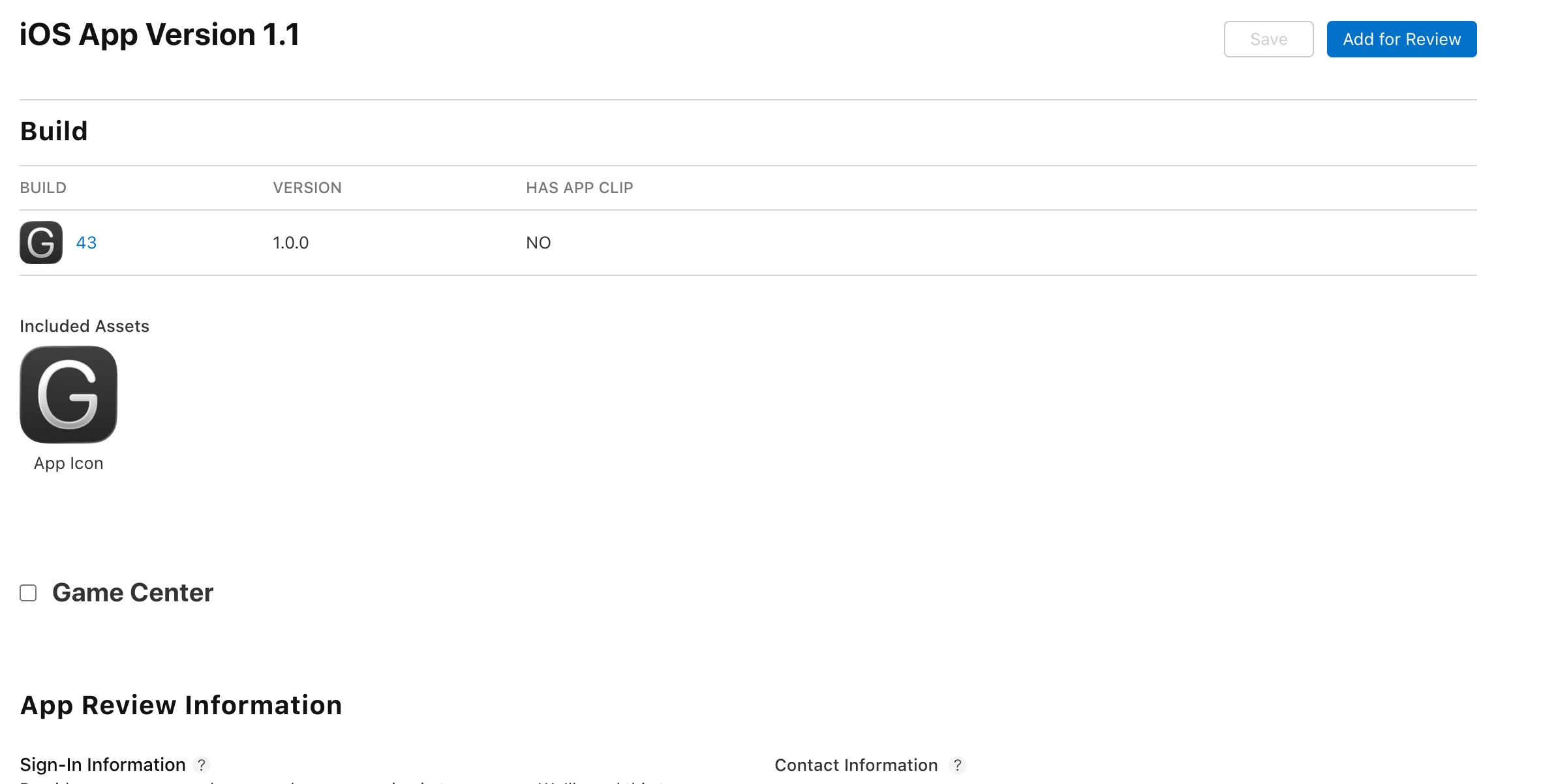
If you cant see the In-app purchases and subscriptions section. Why may this be? 

​​​​​

As you can see from my screenshot - I do not have the In app purchases and subscription section mentioned.

although I’m pretty sure it was attached to the last application I did which got rejected last time.

I have seen that a few people have mentioned if you do not have your app store connect → business agreements all done - this can occur. But in my case I think this has indeed been done.

Any help appreciated!


matt-heaney
RevenueCat Staff
Forum|alt.badge.img
  • RevenueCat Staff
  • January 15, 2026

Hey ​@max-church!

Thanks for the reply!

The required section (the one that is currently missing for you) only appears when a subscription is “Ready to Submit”. As all of your subscriptions are currently “Waiting for Review”, the section will be hidden.

Once Apple has manually rejected these subscriptions and they can be moved back to a “Ready to Submit” state, the section will appear again and you’ll be all good to go from there!

Please let me know if you run into any other issues, I’d be delighted to help!