Answer

App crashes on Android when making a purchase with Kotlin Multiplatform SDK

  • September 22, 2025
  • 18 replies
  • 189 views

Forum|alt.badge.img+2

I am getting the following crashes on Android using revenueCat KMP SDK. And it has increased recently. What could be the issue?

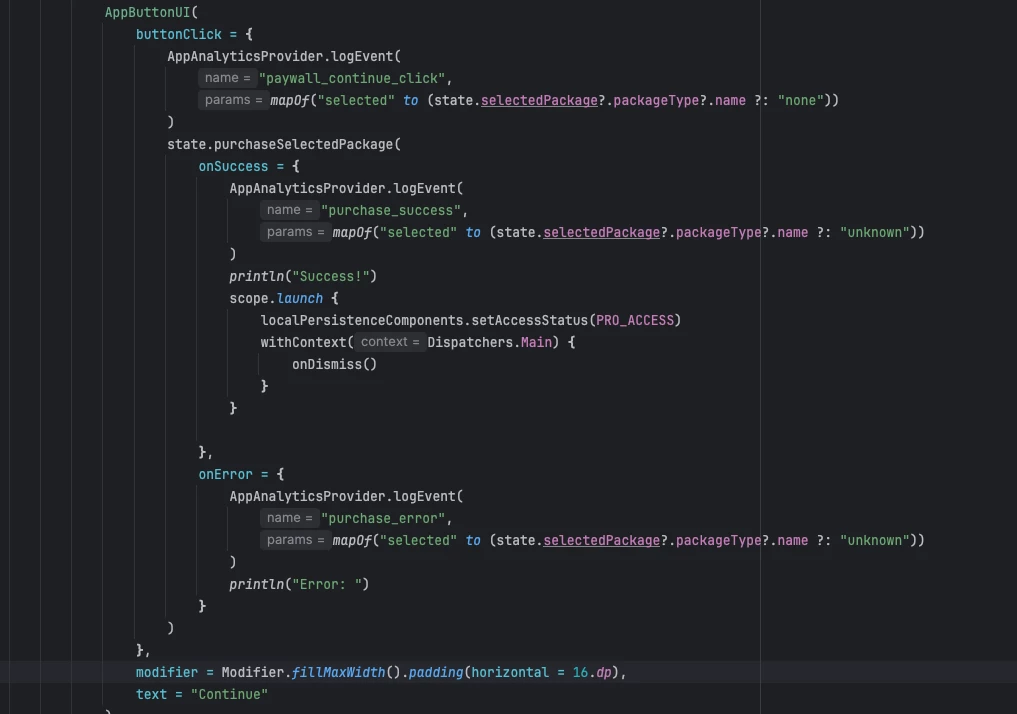
The attached two files are of the PaywallState and Purchase click button codes


Exception java.lang.IllegalStateException:
at com.revenuecat.purchases.kmp.di.AndroidProviderKt.requireActivity (AndroidProvider.kt:83)
at com.revenuecat.purchases.kmp.Purchases.purchase (Purchases.android.kt:275)
at com.revenuecat.purchases.kmp.Purchases.purchase$default (Purchases.android.kt:266)
at utils.PaywallState.purchaseSelectedPackage (PaywallState.kt:29)
at pro.ui.paywall.PaywallScreenKt.PaywallScreen$lambda$41$lambda$40$lambda$39$lambda$26$lambda$25 (PaywallScreen.kt:230)
at androidx.compose.foundation.ClickableNode.onPointerEvent-H0pRuoY (Clickable.kt:1018)
at androidx.compose.ui.input.pointer.Node.dispatchMainEventPass (HitPathTracker.kt:436)
at androidx.compose.ui.input.pointer.Node.dispatchMainEventPass (HitPathTracker.kt:422)
at androidx.compose.ui.input.pointer.NodeParent.dispatchMainEventPass (HitPathTracker.kt:275)
at androidx.compose.ui.input.pointer.HitPathTracker.dispatchChanges (HitPathTracker.kt:171)
at androidx.compose.ui.input.pointer.PointerInputEventProcessor.process-BIzXfog (PointerInputEventProcessor.kt:118)
at androidx.compose.ui.platform.AndroidComposeView.sendMotionEvent-8iAsVTc (AndroidComposeView.android.kt:2813)
at androidx.compose.ui.platform.AndroidComposeView.handleMotionEvent-8iAsVTc (AndroidComposeView.android.kt:2763)
at androidx.compose.ui.platform.AndroidComposeView.dispatchTouchEvent (AndroidComposeView.android.kt:2604)
at android.view.ViewGroup.dispatchTransformedTouchEvent (ViewGroup.java:3222)
at android.view.ViewGroup.dispatchTouchEvent (ViewGroup.java:2867)
at android.view.ViewGroup.dispatchTransformedTouchEvent (ViewGroup.java:3222)
at android.view.ViewGroup.dispatchTouchEvent (ViewGroup.java:2867)
at android.view.ViewGroup.dispatchTransformedTouchEvent (ViewGroup.java:3222)
at android.view.ViewGroup.dispatchTouchEvent (ViewGroup.java:2867)
at android.view.ViewGroup.dispatchTransformedTouchEvent (ViewGroup.java:3222)
at android.view.ViewGroup.dispatchTouchEvent (ViewGroup.java:2867)
at com.android.internal.policy.DecorView.superDispatchTouchEvent (DecorView.java:567)
at com.android.internal.policy.PhoneWindow.superDispatchTouchEvent (PhoneWindow.java:1917)
at android.app.Activity.dispatchTouchEvent (Activity.java:4256)
at com.android.internal.policy.DecorView.dispatchTouchEvent (DecorView.java:515)
at android.view.View.dispatchPointerEvent (View.java:14940)
at android.view.ViewRootImpl$ViewPostImeInputStage.processPointerEvent (ViewRootImpl.java:7018)
at android.view.ViewRootImpl$ViewPostImeInputStage.onProcess (ViewRootImpl.java:6779)
at android.view.ViewRootImpl$InputStage.deliver (ViewRootImpl.java:6244)
at android.view.ViewRootImpl$InputStage.onDeliverToNext (ViewRootImpl.java:6306)
at android.view.ViewRootImpl$InputStage.forward (ViewRootImpl.java:6267)
at android.view.ViewRootImpl$AsyncInputStage.forward (ViewRootImpl.java:6441)
at android.view.ViewRootImpl$InputStage.apply (ViewRootImpl.java:6275)
at android.view.ViewRootImpl$AsyncInputStage.apply (ViewRootImpl.java:6498)
at android.view.ViewRootImpl$InputStage.deliver (ViewRootImpl.java:6248)
at android.view.ViewRootImpl$InputStage.onDeliverToNext (ViewRootImpl.java:6306)
at android.view.ViewRootImpl$InputStage.forward (ViewRootImpl.java:6267)
at android.view.ViewRootImpl$InputStage.apply (ViewRootImpl.java:6275)
at android.view.ViewRootImpl$InputStage.deliver (ViewRootImpl.java:6248)
at android.view.ViewRootImpl.deliverInputEvent (ViewRootImpl.java:9396)
at android.view.ViewRootImpl.doProcessInputEvents (ViewRootImpl.java:9336)
at android.view.ViewRootImpl.enqueueInputEvent (ViewRootImpl.java:9282)
at android.view.ViewRootImpl$WindowInputEventReceiver.onInputEvent (ViewRootImpl.java:9551)
at android.view.InputEventReceiver.dispatchInputEvent (InputEventReceiver.java:265)
at android.os.MessageQueue.nativePollOnce
at android.os.MessageQueue.next (MessageQueue.java:339)
at android.os.Looper.loopOnce (Looper.java:179)
at android.os.Looper.loop (Looper.java:344)
at android.app.ActivityThread.main (ActivityThread.java:8249)
at java.lang.reflect.Method.invoke
at com.android.internal.os.RuntimeInit$MethodAndArgsCaller.run (RuntimeInit.java:589)
at com.android.internal.os.ZygoteInit.main (ZygoteInit.java:1071)

I have added this code snippet to my manifest
 

      <provider
android:name="androidx.startup.InitializationProvider"
android:exported="false"
android:authorities="${applicationId}.androidx-startup"
tools:node="merge">

<meta-data
android:name="androidx.work.WorkManagerInitializer"
android:value="androidx.startup"
tools:node="remove" />

</provider>

 

Best answer by JayShortway

user clicks on the continue button then close the billing sheet and select the weekly package


When they close the billing sheet, I would expect another screen_view event in the breadcrumb with the MainActivity again. 

I actually may have found something: could you try if you can reproduce the issue by pressing the purchase button twice in really fast succession? 

This post has been closed for comments

18 replies

JayShortway
RevenueCat Staff
Forum|alt.badge.img+5
  • RevenueCat Staff
  • September 23, 2025

Hi ​@Md-Atif, thanks for reporting. Sorry to hear you're experiencing crashes. Some questions:

  1. Are you able to reproduce this crash locally? 
  2. What is hosting your AppButtonUI? Is it an Activity, a Dialog, or some other component? 
  3. Do you have a requirement to disable automatic WorkManager initialization?
    1. If not, could you try removing that snippet from your AndroidManifest.xml file?
    2. If you do, could you double check the final AndroidManifest.xml file in your app and make sure it contains com.revenuecat.purchases.kmp.di.PurchasesInitializer?

Thanks in advance!


Forum|alt.badge.img+2
  • Author
  • Active Member
  • September 23, 2025

@JayShortway Thanks for the reply. 
1. No, I checked but I can’t reproduce it.
2. The UI is made using compose multiplatform so it’s one activity and composable functions. The button is a common composable where I am using it in all my app.​

3 No, I don’t use WorkManager in my app. First time when I got these errors so I checked the community answers and found this conversation App Crashes on Android using KMP SDK So I added these lines from this conversation.
After removing these lines following is included in final merged Manifest. 

<provider
android:name="androidx.startup.InitializationProvider"
android:authorities="abma.facescore.pro.androidx-startup"
android:exported="false" >
<meta-data
android:name="com.revenuecat.purchases.kmp.di.PurchasesInitializer"
android:value="androidx.startup" />
<meta-data
android:name="dev.jordond.connectivity.tools.ContextProviderInitializer"
android:value="androidx.startup" />
<meta-data
android:name="androidx.emoji2.text.EmojiCompatInitializer"
android:value="androidx.startup" />
<meta-data
android:name="androidx.lifecycle.ProcessLifecycleInitializer"
android:value="androidx.startup" />
<meta-data
android:name="androidx.profileinstaller.ProfileInstallerInitializer"
android:value="androidx.startup" />
</provider>

​​​​​​

Is there a possibility that these error maybe due to these lines in the manifest?

        <provider
android:name="androidx.startup.InitializationProvider"
android:exported="false"
android:authorities="${applicationId}.androidx-startup"
tools:node="merge">

<meta-data
android:name="androidx.work.WorkManagerInitializer"
android:value="androidx.startup"
tools:node="remove" />

</provider>



JayShortway
RevenueCat Staff
Forum|alt.badge.img+5
  • RevenueCat Staff
  • September 24, 2025

Hi ​@Md-Atif, thanks for answering the questions! If you don't use WorkManager, there's no need to add that snippet to your AndroidManifest.xml. Better to remove it, to completely avoid the chance of an error. 

The final AndroidManifest.xml looks good. The com.revenuecat.purchases.kmp.di.PurchasesInitializer is correctly declared. I don't expect the issue to be caused by the AndroidManifest.xml. 

Could you share the implementation of AppButtonUI?


Forum|alt.badge.img+2
  • Author
  • Active Member
  • September 24, 2025

Hello ​@JayShortway I have added 2 screen shots with 1st post. Please have a look at them


Forum|alt.badge.img+2
  • Author
  • Active Member
  • September 24, 2025

Let me share it again here 


JayShortway
RevenueCat Staff
Forum|alt.badge.img+5
  • RevenueCat Staff
  • September 24, 2025

Hi ​@Md-Atif, the screenshot shows how you're calling AppButtonUI, but I'd like to see how it's implemented. I want to understand what AppButtonUI is doing exactly, specifically with the buttonClick parameter it gets.


Forum|alt.badge.img+2
  • Author
  • Active Member
  • September 24, 2025

Here is the code


@Composable
fun AppButtonUI(text: String, buttonClick: () -> Unit, modifier: Modifier = Modifier) {
Button(
onClick = buttonClick,
modifier = modifier
.fillMaxWidth()
.height(56.dp),
colors = ButtonDefaults.buttonColors(
containerColor = colorSoftBlue,
disabledContainerColor = colorButtonDisable
),
shape = CircleShape,
) {
Text(
text = text,
style = plus_jakarta_sans__semi_bold_lh20_white_14,
fontFamily = FontFamily(Font(Res.font.plus_jakarta_sans_semibold)),

)
}
}


JayShortway
RevenueCat Staff
Forum|alt.badge.img+5
  • RevenueCat Staff
  • September 24, 2025

Thanks for sharing that! Nothing immediate stands out. I suspect that Button is a plain Material button, nothing custom?

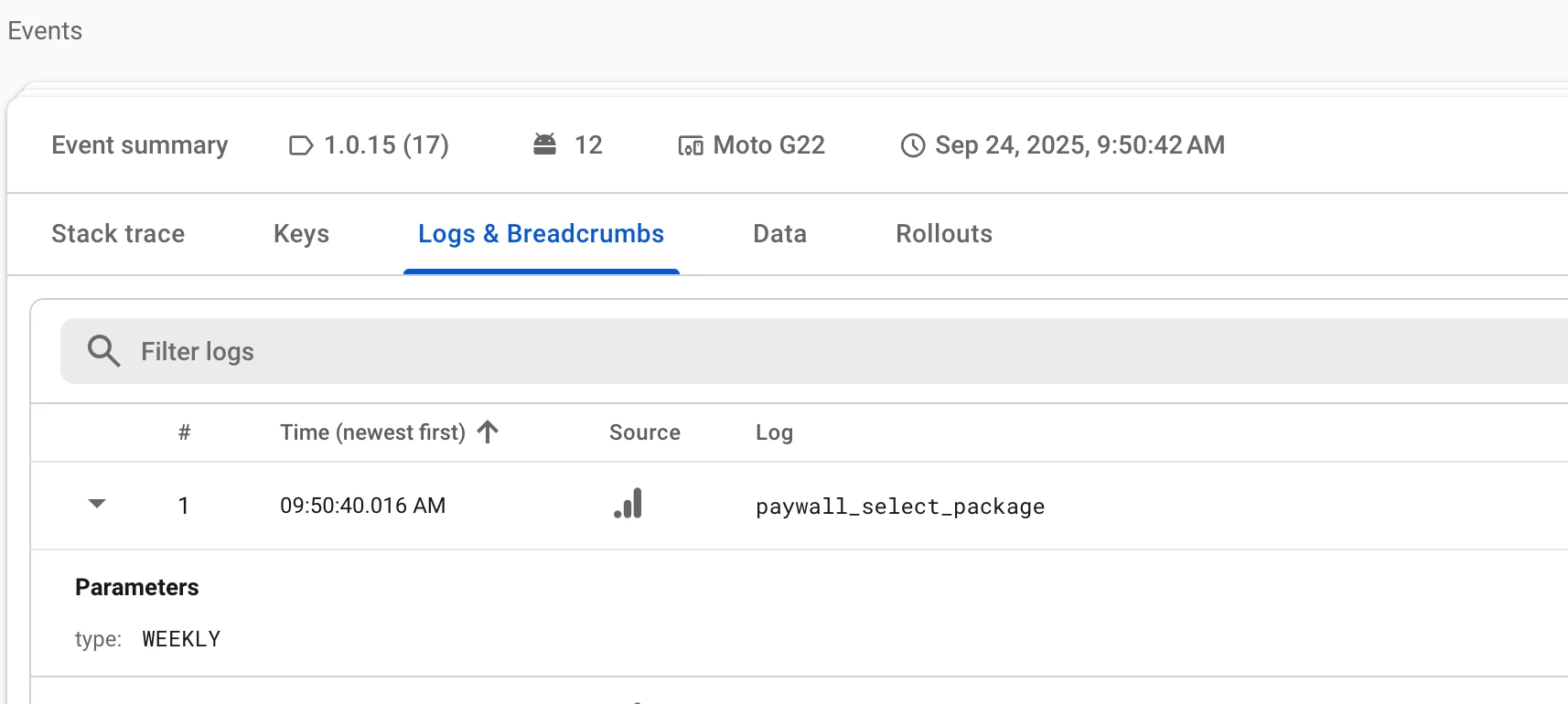
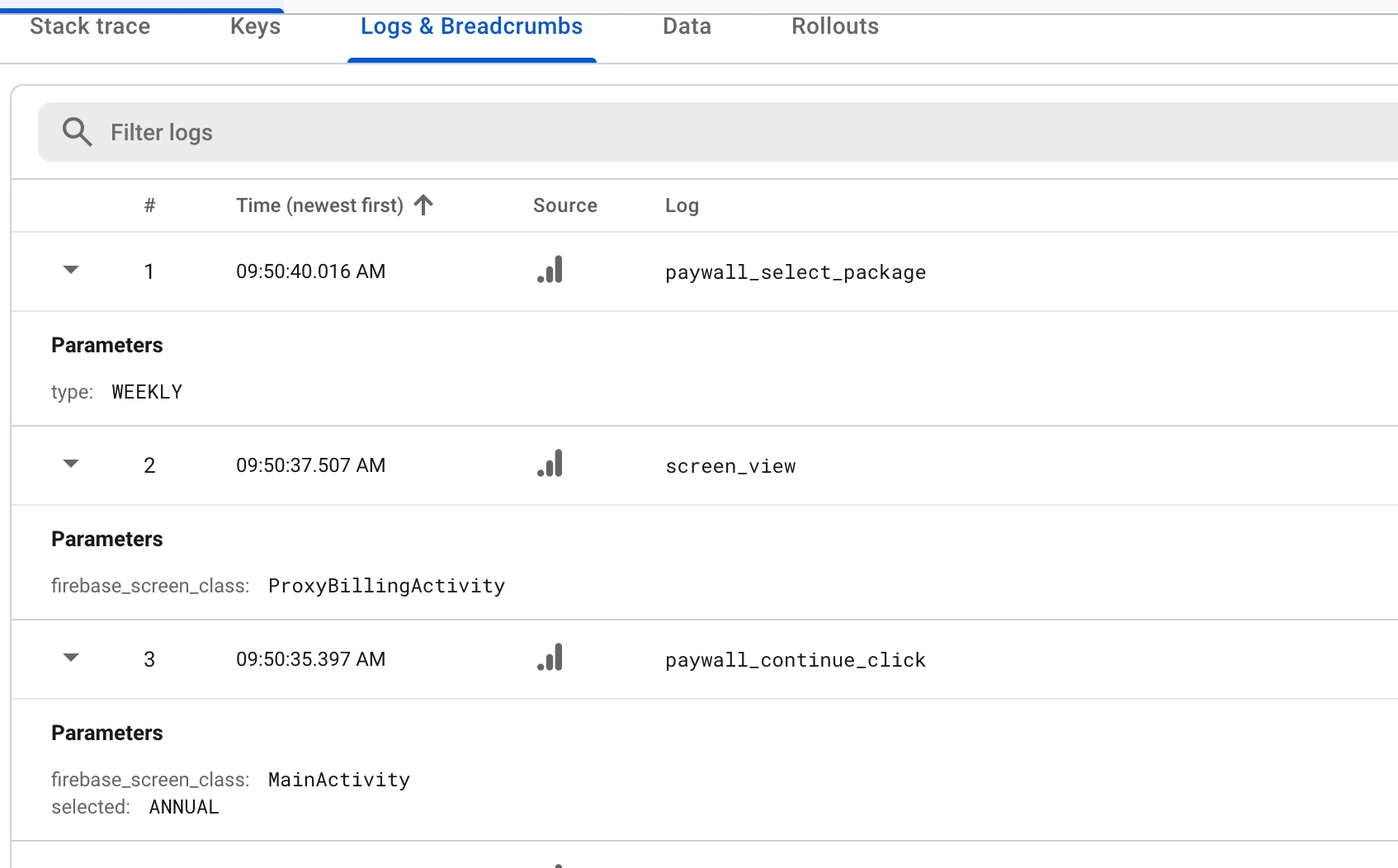
This crash could be caused by the app being backgrounded before the purchase() function runs. I'm not seeing any indication in the code you shared that this is the cause here, but maybe it gives you any ideas? Are you able to see the foreground/background stats for this crash in your crash reporting tool? Also, if you're using Crashlytics you might have some breadcrumbs indicating what the user was doing (e.g. whether they backgrounded the app) when the crash occurred.   

Lastly, which version of Compose are you using?


Forum|alt.badge.img+2
  • Author
  • Active Member
  • September 24, 2025

Yes it’s a plain Material3 Button. Currently I am using Compose Multiplatform 1.10.0-alpha01 and revenueCat 2.1.1+17.0.0


Here is data for the latest crash


JayShortway
RevenueCat Staff
Forum|alt.badge.img+5
  • RevenueCat Staff
  • September 24, 2025

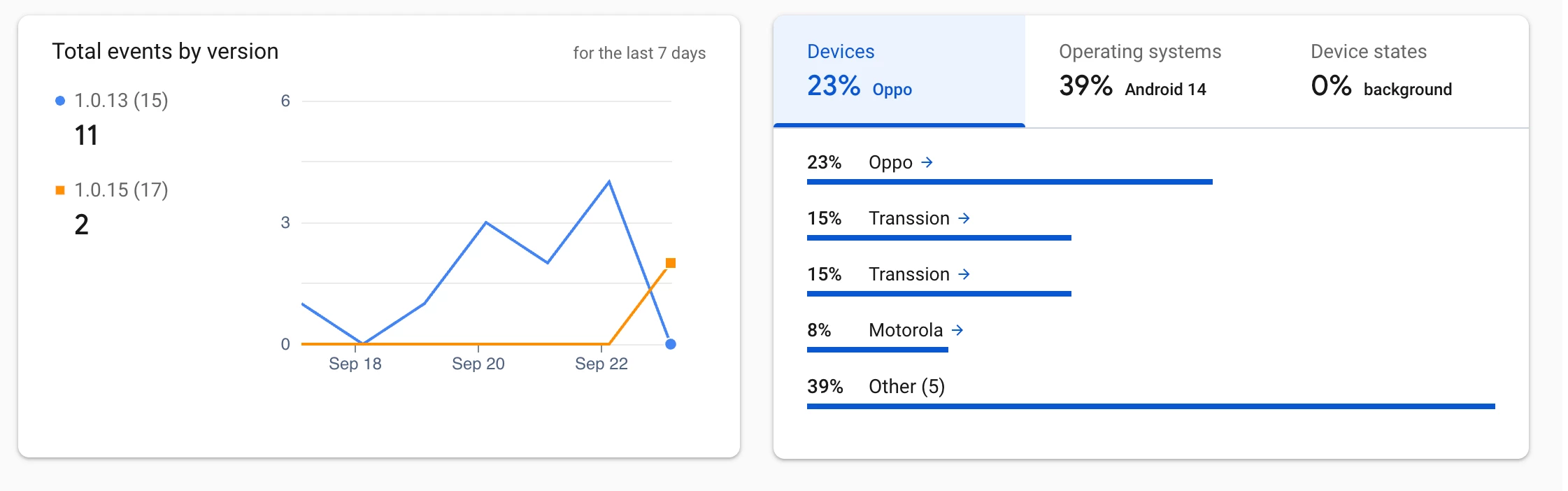
Thanks for this! A little bit higher up on the screen you should see stats for all crashes. It contains things like which devices and Android versions it happens on, but also whether it happens in the foreground or background. Could you share that as well? 

One curious thing from the breadcrumb you shared is that the user is pressing the purchase button for the ANNUAL product, then sees the Google Play purchase sheet (ProxyBillingActivity), and while that sheet is showing they somehow select the WEEKLY product. Do you have any idea what's going on there?


Forum|alt.badge.img+2
  • Author
  • Active Member
  • September 24, 2025

Here are the states


Forum|alt.badge.img+2
  • Author
  • Active Member
  • September 24, 2025

About the breadcrumb data my guess is that by default the Annual is selected user clicks on the continue button then close the billing sheet and select the weekly package and after that the app crashes so I think upon Continue button click the app then crashes.


JayShortway
RevenueCat Staff
Forum|alt.badge.img+5
  • RevenueCat Staff
  • Answer
  • September 25, 2025

user clicks on the continue button then close the billing sheet and select the weekly package


When they close the billing sheet, I would expect another screen_view event in the breadcrumb with the MainActivity again. 

I actually may have found something: could you try if you can reproduce the issue by pressing the purchase button twice in really fast succession? 


Forum|alt.badge.img+2
  • Author
  • Active Member
  • September 25, 2025

Finally it’s reproduced. Thanks for the help and support. But I am wondering who would do such fast clicks like it really needs fast clicks to reproduce it


JayShortway
RevenueCat Staff
Forum|alt.badge.img+5
  • RevenueCat Staff
  • September 25, 2025

Thanks for confirming that it reproduces on your end! I've opened a PR with a fix in the SDK. I'll make sure to release it ASAP. If you can't wait, you could try to disable the purchase button as soon as it is clicked the first time. That might be the most elegant fix either way, but of course the SDK shouldn't crash. Apologies for the trouble, and thanks for your patience! 


Forum|alt.badge.img+2
  • Author
  • Active Member
  • September 25, 2025

Sure! And thanks again for your time and support


JayShortway
RevenueCat Staff
Forum|alt.badge.img+5
  • RevenueCat Staff
  • September 25, 2025

2.1.5+17.7.0 has been released with the fix. Thanks again! 


Forum|alt.badge.img+2
  • Author
  • Active Member
  • September 25, 2025

Thanks for the support. Sure will now update it