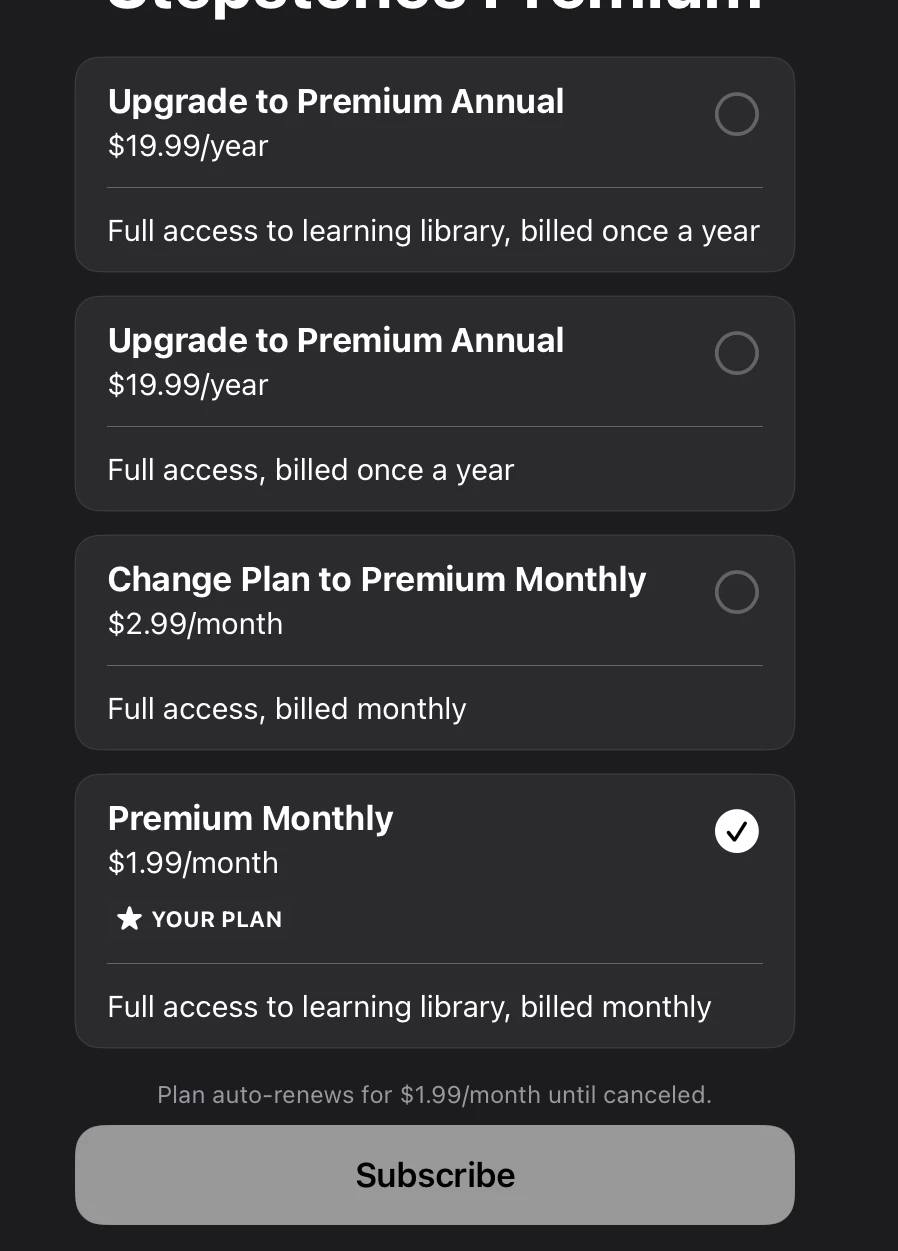
Question

Unexpected "Change Plans" options

  • August 26, 2026
  • 2 replies
  • 14 views

Forum|alt.badge.img

When I try to “Change Plans” using the Customer Center in my ios app, it shows 2 previously deleted App Store Connect subscriptions in addition to the 2 active ones. How can I prevent this from happening? This would be fine if I could configure the subset of options in the RCs “Customer Center” configuration page, but it says I only have 2 subscriptions so I can’t customize it. So there’s a disconnect between how many RC thinks there are and how many options are shown.

Also, those two deleted ones were not added to RevenueCat initially when syncing for App Store Connect, but when my app (which was updated from an older version which referenced the deleted plan) connected to RevenueCat for the first time, the deleted plan also populated into RevenueCat’s list of Products.

I’m using SDK 5.85.0.

2 replies

Forum|alt.badge.img+8
  • RevenueCat Staff
  • August 26, 2026

Hi, Customer Center Change Plans uses the App Store Connect subscription group. Your’s currently has two approved products premium.monthly.1 and premium.annual.1 (shortened to censor them). With two or fewer products in a group, the dashboard cannot customize the list and the SDK shows every StoreKit product in that group. That’s expected based on our docs here Change Plans on iOS:

If your subscription group has 2 or fewer products, the configuration is automatic and all available products in the group will be shown as change options. Manual configuration is only available for subscription groups with 3 or more products.


The other two products you have premium.monthly and dummy are not in that App Store Connect group. They were added to RevenueCat automatically when the older app version posted a receipt that still referenced those product IDs — which is why they showed up in the Product catalog after first connect. To hide them:

  1. Delete them from your RevenueCat Product catalog.
  2. Remove those product IDs from the app (and from any StoreKit Configuration file) so the SDK stops fetching them.
  3. Do a clean install so StoreKit isn’t serving a cached copy of the old SKUs.

Change Plans customization will stay locked while the group has only two live subscriptions. That’s by design; you don’t need a subset picker if only premium.monthly.1 and premium.annual.1 remain.

Let me know if this fixes it and if you have any questions!


Forum|alt.badge.img
  • Author
  • New Member
  • August 27, 2026

Thanks for looking into this!
I think I’ve already gone through the checklist, and yet the outdated subscriptions still show up.

To hide them:
  1. Delete them from your RevenueCat Product catalog.

Right now, there’s a premium.annual subscription showing up in the Change Plans page, but it’s already not in the RC Product catalog as you saw.

  1. Remove those product IDs from the app (and from any StoreKit Configuration file) so the SDK stops fetching them.

I’ve grepped for the product id in my code, and I’m pretty sure the outdated product id isn’t mentioned anywhere.

% git grep premium.monthly
Stepstones/Stepstones.storekit: "internalID" : "premium-monthly",
Stepstones/Stepstones.storekit: "productID" : "...Stepstones.premium.monthly.1",
% git grep "premium.annual"
Stepstones/Stepstones.storekit: "internalID" : "premium-annual",
Stepstones/Stepstones.storekit: "productID" : "...Stepstones.premium.annual.1",
  1. Do a clean install so StoreKit isn’t serving a cached copy of the old SKUs.

I did a TestFlight install on a new device, and the outdated products still show up in the Change Plans screen.

I think the premium.monthly only showed up in RC because my test apple id had previously subscribed to that plan. If a user had previously subscribed to one of those outdated plans, is there any hope of getting rid of it completely? 

The workarounds I see are to add a dummy subscription on the app store connect side (so I can customize on RC), or just remove the Change Plans option from the Customer Center. But if you have any other ideas to fix the issue, I’d rather not employ either of these workarounds.