

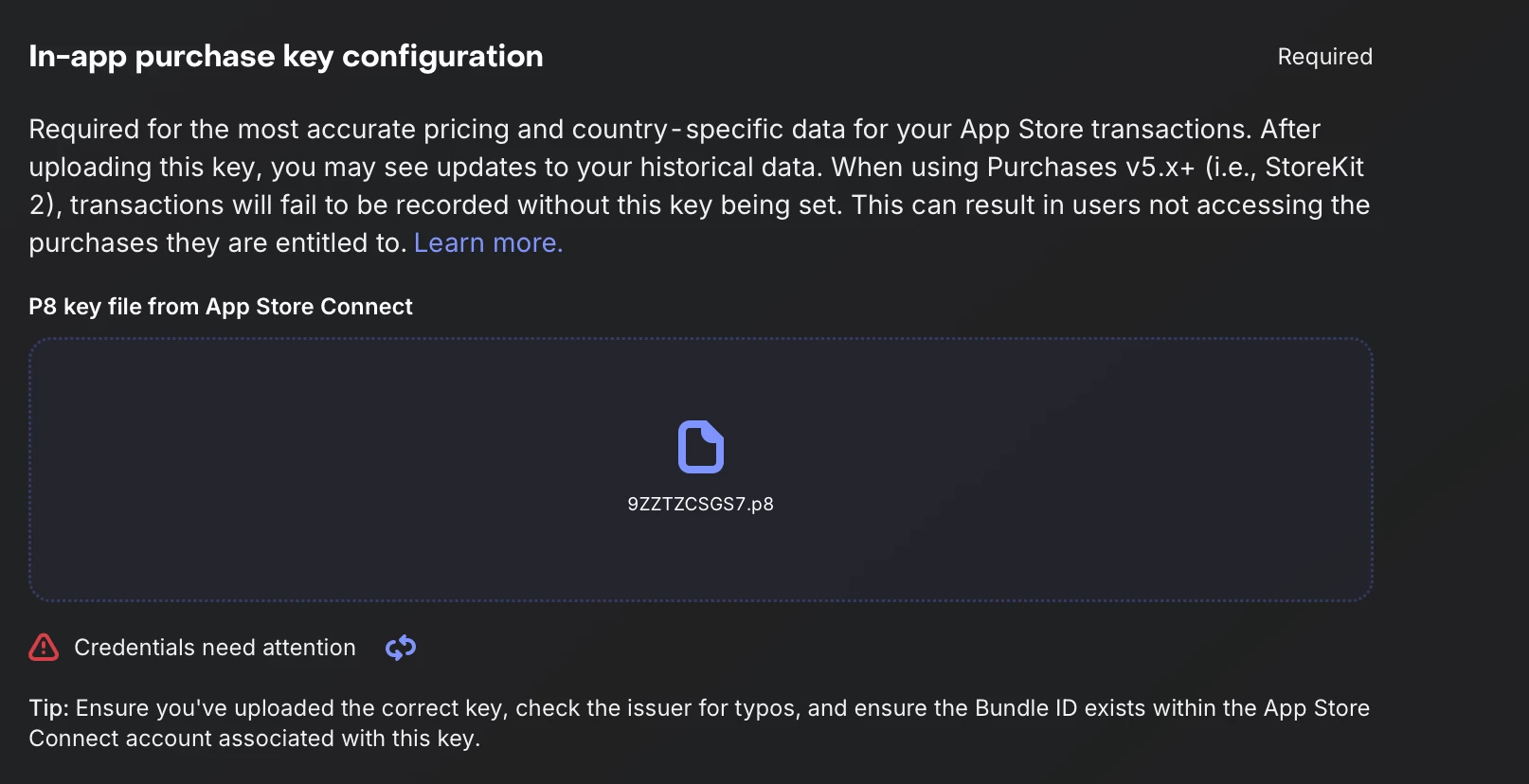
Question

The key is not valid or is not compatible with the Bundle ID of your app.

  • July 25, 2026
  • 11 replies
  • 128 views

Forum|alt.badge.img


Hi RevenueCat team,

I'm setting up in-app purchases for one of my apps and running into a persistent issue with the In-App Purchase Key validation. I'd appreciate your help investigating.

App details:

  • App: Step Tourist (App Store)
  • Bundle ID: com.example.step-tourist
  • Key ID: 9ZZTZCSGS7
  • Issuer ID: fefc0472-3433-4064-8745-2e1006a85731
  • Apple Developer Team ID: J4BSW8LU89
  • The app record in App Store Connect was created about 17 hours ago, so this doesn't appear to be a short propagation delay.

The issue:
The In-App Purchase Key configuration shows "Credentials need attention" ("The key is not valid or is not compatible with the Bundle ID of your app"), even though everything appears correctly configured.

What I've already verified:

  1. The uploaded file is from Users and Access → Integrations → In-App Purchase (not the App Store Connect API tab) — filename SubscriptionKey_9ZZTZCSGS7.p8.
  2. The Bundle ID matches exactly (case-sensitive) across Xcode's PRODUCT_BUNDLE_IDENTIFIER, App Store Connect's app record, and the RevenueCat app settings. I retyped it manually in all three places to rule out hidden/look-alike characters.
  3. The Issuer ID matches what's shown specifically on the In-App Purchase tab in App Store Connect.
  4. The Key ID matches exactly what App Store Connect shows.
  5. The key shows as Active (not revoked) in App Store Connect.
  6. Both this app and another app in the same RevenueCat project (Daily Tarot, Bundle ID com.blkstudio.tarotly) are under the same Apple Developer Team ID (J4BSW8LU89) — and this exact same key already works correctly for Daily Tarot.
  7. For this same app, the App Store Connect API key shows "Valid credentials" — only the In-App Purchase Key fails.

What I've also tried:

  • Regenerating the In-App Purchase Key entirely (new Key ID/Issuer combination) — same result.
  • Deleting and recreating the app in App Store Connect with the same bundle ID — same result.
  • Waiting over 17 hours in case of a propagation delay — no change.
  • Re-uploading a different file temporarily, then re-uploading the correct one, to try to force re-validation — no change.
  • Confirmed Paid Applications Agreement, Bank Account, and Tax Forms are all Active in App Store Connect.

Since everything checks out on my end, this same key works for another app under the identical Team, and 17 hours have passed since the app was created, I suspect there might be something specific to this Bundle ID/app combination on Apple's or RevenueCat's backend. Could you take a look and let me know what the actual error response is when validating this key against this bundle ID?

Thanks in advance for your help!

11 replies

I'm having the same issue right now.

I have just added my fourth iOS app to RevenueCat. All of them use the same Apple account - hence they all use the same P8 keys. And even though my first three apps work with no issues - the fourth one says:

The key is not valid or is not compatible with the Bundle ID of your app.

I’ve triple-checked everything: the P8 key file is correct, as well as Bundle ID, Key ID and Issuer ID - all correct.


  • New Member
  • July 25, 2026

I'm having the exact same issue! 🙋‍♂️ My In-App Purchase Key is active and works completely fine for my other app under the same Team, but for the new app it throws: "The key is not valid or is not compatible with the Bundle ID of your app".

Everything is verified: Bundle IDs match, App Store Connect API shows valid, Paid Agreements are signed, and I've waited over 10 hours.

Did you manage to find a fix for this, or did RevenueCat support have to step in?


Forum|alt.badge.img
  • New Member
  • July 25, 2026

I’m experiencing the same issue. RevenueCat shows “Credentials need attention” and says the key is not valid or is not compatible with my app’s Bundle ID.

I’ve double-checked the P8 file, Key ID, Issuer ID, and Bundle ID, and they all appear to be correct. The In-App Purchase Key is also active in App Store Connect. I’ve tried uploading the key again and revalidating it, but the error still remains.

Is this a known issue affecting newly added apps? Has anyone found a workaround, or does RevenueCat support need to resolve it?


  • New Member
  • July 25, 2026

Same issue since yesterday. I guess we have to wait for the hotfix till monday 😅


Forum|alt.badge.img
  • New Member
  • July 25, 2026

Same issue

I have checked:
1. The Bundle ID in App Store Connect
2. Bundle ID given in RevenueCat
3. Bundle ID in Xcode

All are same and case sensitivity check is also done

All my agreements in the App Store Connect are active

This is my 15th app in RevenueCat and this is the first time I have got this issue.

I created the App in the App Store Connect in less than 24 hours ago, is that the case ?


  • New Member
  • July 25, 2026

Okay thought I was going crazy :) looks like a AppStore issue. BTW, Google is also having the same issue?


Forum|alt.badge.img
  • New Member
  • July 25, 2026

I tried replicating this on SuperWall and it did not go through, I highly doubt its RevenueCat issue …
As I tried using another Bundle ID ( which is already verified ) and it verified, But once I replaced it again with the one I wanted and tapped refreshed it failed ! 

Make sure you refresh it else RevenueCat will point to the Bundle ID you used for replacing and checking and it will create more problems.

All things point to issue with App Store Connect 


  • New Member
  • July 25, 2026

Same issue here… I was going crazy since yesterday thinking it was something on my end...


Im having the same issue, 3 apps are working with the key while the 4th does not.


I have just opened a support ticket via: https://app.revenuecat.com/settings/support?tab=contact

You might want to do it too.

I’ve also mentioned this post in it.

I’ll let you all know if I get any response.


  • New Member
  • July 25, 2026

This is not a RevenueCat bug, it's on Apple's side. I tested Apple's App Store Server API directly (no RevenueCat involved): the same key gets HTTP 200 for all of my apps created before July 23, and HTTP 401 for all new apps created July 24–25. Same key, same request, only the app changes.

In short: since ~July 23, Apple is not registering newly created apps with the system that validates in-app purchase keys. RevenueCat just show that failure as "key not compatible."

Nothing on our side fixes it. I tried new keys, new bundle IDs, deleting/recreating the app, uploading a build, setting pricing. All old apps keep working; all new apps fail.

I've filed an Apple Developer Support case with this evidence. I'd suggest others do the same so Apple prioritizes it: developer.apple.com → Contact Us → Distribution → In-app Purchase and Subscriptions.