
Question

Tabs not filling properly

  • September 24, 2025
  • 8 replies
  • 78 views

Forum|alt.badge.img

Hello! I am trying to get my tabs to fill the width of their parent container. Everything in the stack is set to fill width, but it’s still not working. Can you please help? 


This post has been closed for comments

8 replies

alejandra-wetsch
RevenueCat Staff
Forum|alt.badge.img+6

Hey ​@sarah-mitrano-80aa4a

Thank you for reaching out!

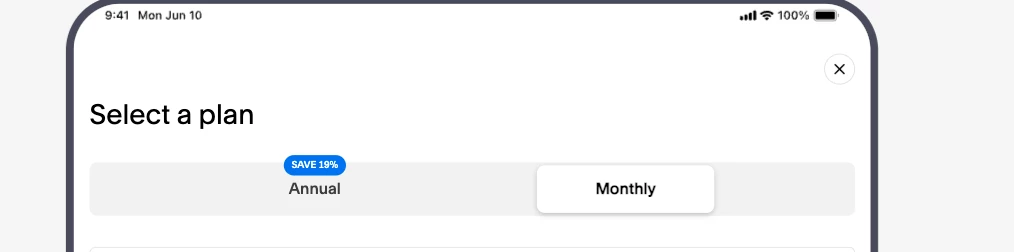
After checking your configuration and running it locally, I was able to see the tabs fill in both orientations (portrait and landscape). I've attached screenshots for reference.

Something I did notice, though, was that the badge is getting clipped for the Annual Tab. I’ve shared this internally with the team so that they can review it.

In the meantime, if you’re still having issues with the tabs not filling the width, and to troubleshoot further, could you please share the following: 

  • SDK version you’re using
  • Devices and OS versions where you see this happening
  • Code snippets showing how you’re displaying your Paywall

Thanks!


Forum|alt.badge.img

Got it! I just confirmed with my developer that he is seeing what you showed in the screenshot. It seems like the preview within Revenue Cat shows up differently for some reason.

He is also seeing the tag clipping issue you mentioned. If you could help us fix, that would be great!


alejandra-wetsch
RevenueCat Staff
Forum|alt.badge.img+6

Hey ​@sarah-mitrano-80aa4a,

Thank you for confirming!

Regarding the tag clipping issue, the team will begin working and have a fix available soon. I’ll keep you posted with updates and let you know as soon as it gets released! 

Thanks!


alejandra-wetsch
RevenueCat Staff
Forum|alt.badge.img+6

Hey ​@sarah-mitrano-80aa4a

I appreciate your patience!

I wanted to provide an update on the tag clipping issue. The team is still working on this. I’ll keep you posted with updates and let you know as soon as it gets released! 


Forum|alt.badge.img

Thank you! I appreciate it.


Forum|alt.badge.img

Hi ​@alejandra-wetsch! Any update on this? 


alejandra-wetsch
RevenueCat Staff
Forum|alt.badge.img+6

Hey ​@sarah-mitrano-80aa4a

Thank you for following up!

Unfortunately, the fix was not as straightforward as it initially seemed. To provide additional information, the Tab Component structure creation and how it gets rendered need to be updated for the badge to work as expected when attached to the Tab Component. This is a work in progress at the moment.

I’ll keep you posted with updates. I apologize for the inconvenience!


alejandra-wetsch
RevenueCat Staff
Forum|alt.badge.img+6

Hey ​@sarah-mitrano-80aa4a

I appreciate your patience!

The team is still working on this issue. I’ll keep you posted with updates. I apologize for the inconvenience!




