Question

STUMPED and CANNOT GO LIVE!! Keeps using same apple account for purchasing???

  • August 24, 2025
  • 7 replies
  • 82 views

Forum|alt.badge.img+3

For the life of me I cannot figure this out! 


I have a year and half of app dev for my app Chip In, everything is tested out perfectly, but this last subscription issue, which is keeping me from going live.


I am testing in Sandbox and 100% logging out of my main apple account michael***@gmail.com completely, logging in to the test phone (latest OS) with a new apple test account setup in sandbox test**@chip***.  So 100% the phone is not logged in with this first account.  No matter what I do, it keeps saying receiptAlreadyInUse when I try to make a purchase of one of my two subscriptions setup in apple.  


My app connects to PLAID financial and i get billed for daily webhook synchronizing one or more of their banks/credit card accounts.  So I can’t just transfer subscriptions to new IDs as they could bounce back and forth between multiple users, while I get charged $$$ in the background from PLAID synchronizing all those accounts with their bank transactions, al though they are effectively only using one account login at a time, my backend doesn’t really care.  PLAID will be charging me synchronizing all of those account banks.  So I have to force them to ONLY have one login (google firebase UID), tied to one RevenueCat app user id.  


Why does it create the first subscription perfectly fine, passing in my Google UID perfectly as my app user id.  Yet even on entirely different phones, different apple accounts, it still seems to want to use this original app user id no matter what NEW App User ID I pass to RevenueCat.


Apple Small Biz Account

Sandbox mode (with several sandbox users set up)

Testing on (real devices):

  • iPhone 16 with latest OS
  • iPhone 15 with latest OS
  • iPhone 14 with latest OS
  • iPhone 11 with latest OS

Distributable .IPA pushed to app store passed review and assigned to testers in Sandbox.


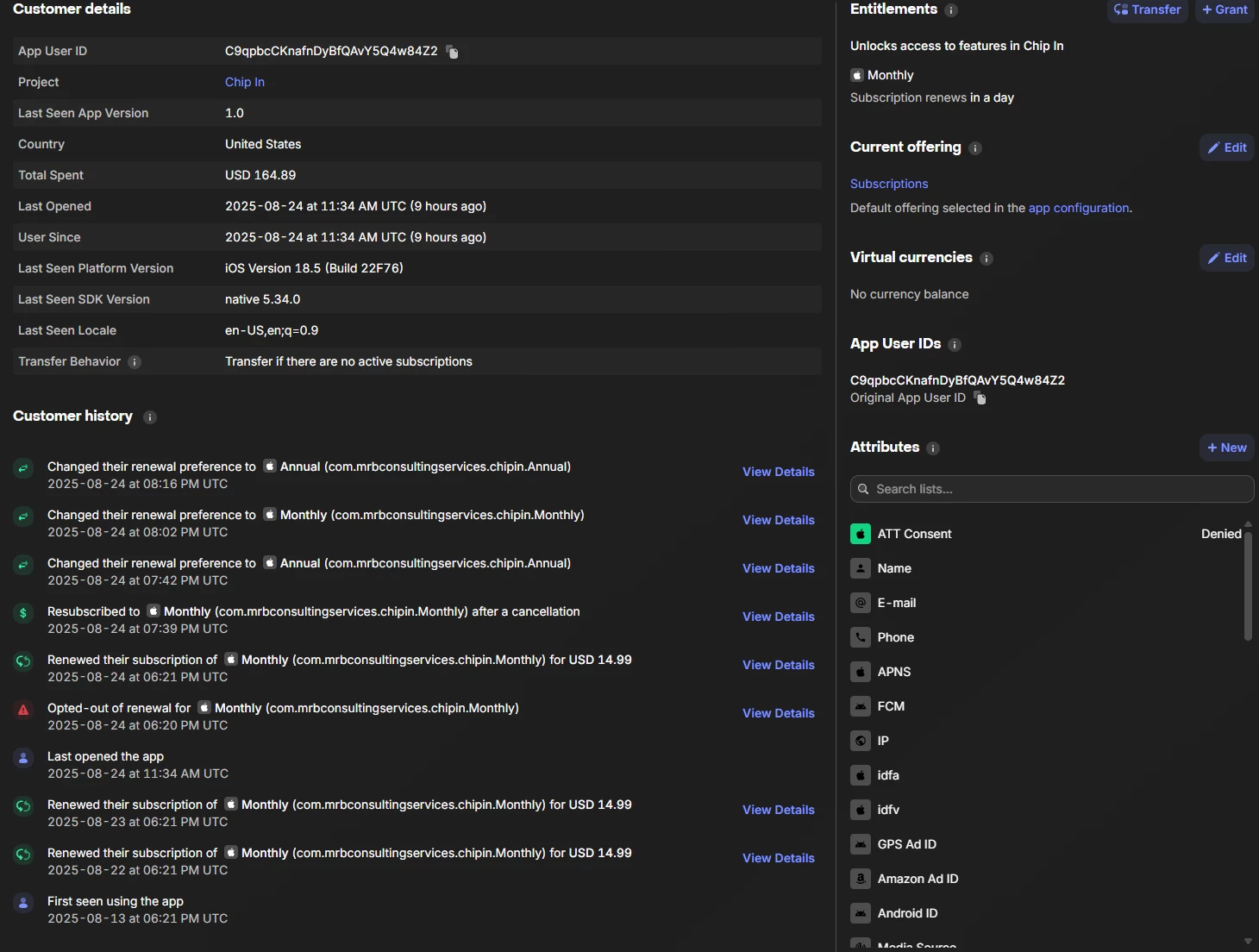
  1. Signed up with user C9qpbcCKnafnDyBfQ**** (michael***).  That subscription shows below in RevenueCat (all good). 
  2. Now no matter what new account I try to sign up with (even with brand new phones not even remotely linked to this apple ID above, it does this:
    1. Sign in with a new user susie***@gmail on a new phone with her apple account, having a app user id of erMD54GnBtUs*****, it simply tells me ReceiptAlreadyInUse, yet in RevenueCat it shows the purchase tied back to the original ID C9qpbcCKnafnDyBfQ****, but just showing me effectively switching back and forth between monthly/yearly.
    2. Signed in again on another new phone with mi**@chi***, UID of 9s6Zk0H3cjUggzN***, same deal, ReceiptAlreadyInUse, yet in RevenueCat, it shows once again, the single and ONLY user in my sandbox, C9qpbcCKnafnDyBfQ****, just showing that transaction as switching to another plan type.  
    3. So on and so forth.  
    4. It NEVER creates a new user even though in Initialize I am passing the unique ID (even tested with logging and debug mode), it’s for sure sending a new UID, but for some reason it still thinks it’s the same old user from my very first purchase???  That is so strange??
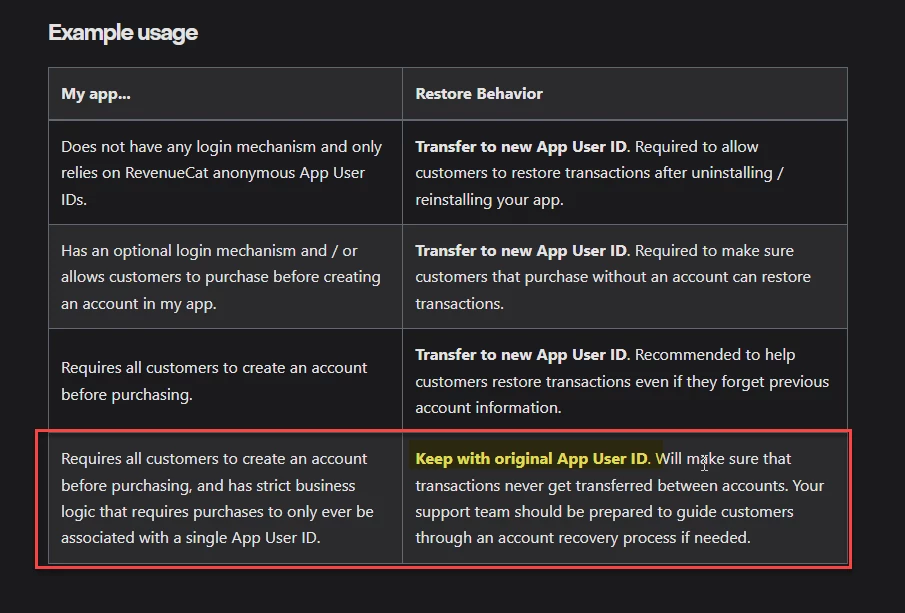
    5. I don't want to have to switch to Transfer to new App User ID or Transfer if there are no active subscriptions.
    6. I need it to be the third option: Keep with original App User ID


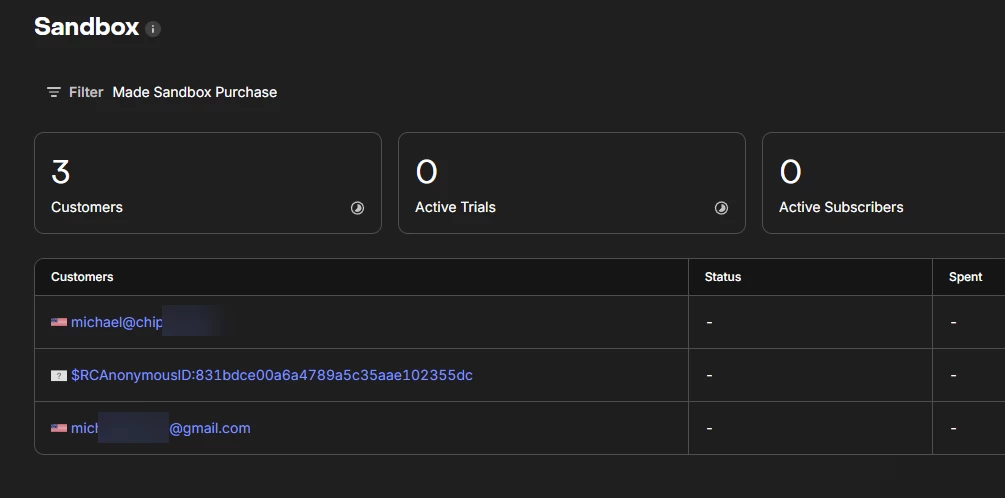
I fall into this category: 
 

Here is the transaction list of the ONLY sandbox customer I have.  It simply will not (refuses) to create a new user even though I am passing a new app user id.
 

This post has been closed for comments

7 replies

Forum|alt.badge.img+3

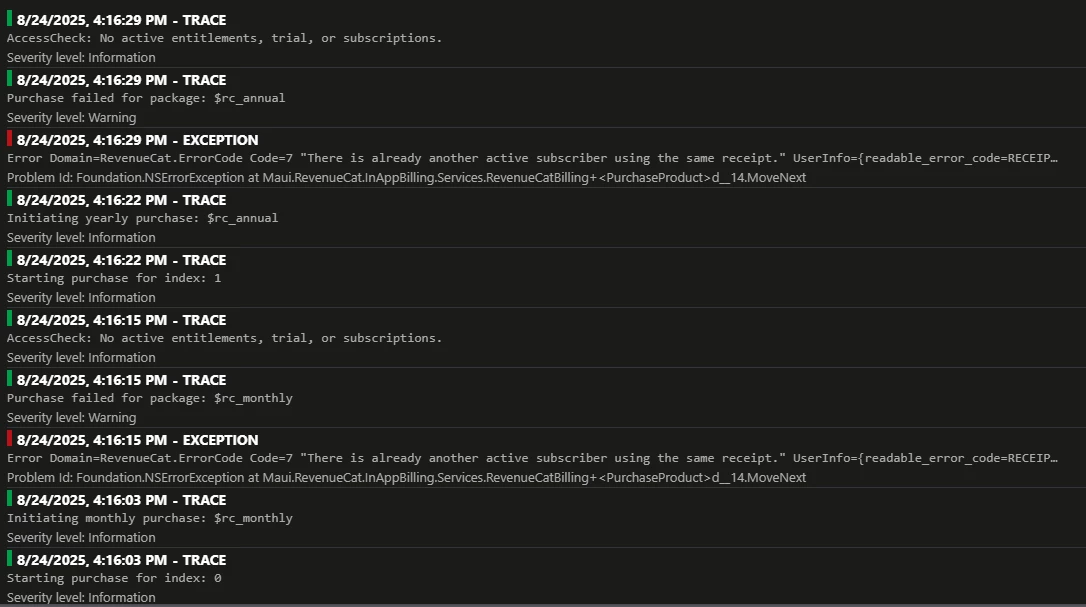
Here is error info I log in the background:


Error Domain=RevenueCat.ErrorCode Code=7 "There is already another active subscriber using the same receipt." UserInfo={readable_error_code=RECEIPT_ALREADY_IN_USE, source_function=parseUnsuccessfulResponse(), NSUnderlyingError=0x12e5d89f0 {Error Domain=RevenueCat.BackendErrorCode Code=7102 "There is already another active subscriber using the same receipt." UserInfo={rc_backend_error_code=7102, NSLocalizedDescription=There is already another active subscriber using the same receipt.}}, rc_response_status_code=400, NSLocalizedDescription=There is already another active subscriber using the same receipt., rc_backend_error_code=7102, source_file=RevenueCat/HTTPClient.swift:945, rc_root_error={
code = 7102;
domain = "RevenueCat.BackendErrorCode";
localizedDescription = "There is already another active subscriber using the same receipt.";
}} userCancelled: False Error Domain=RevenueCat.ErrorCode Code=7 "There is already another active subscriber using the same receipt." UserInfo={readable_error_code=RECEIPT_ALREADY_IN_USE, source_function=parseUnsuccessfulResponse(), NSUnderlyingError=0x12e5d89f0 {Error Domain=RevenueCat.BackendErrorCode Code=7102 "There is already another active subscriber using the same receipt." UserInfo={rc_backend_error_code=7102, NSLocalizedDescription=There is already another active subscriber using the same receipt.}}, rc_response_status_code=400, NSLocalizedDescription=There is already another active subscriber using the same receipt., rc_backend_error_code=7102, source_file=RevenueCat/HTTPClient.swift:945, rc_root_error={
code = 7102;
domain = "RevenueCat.BackendErrorCode";
localizedDescription = "There is already another active subscriber using the same receipt.";
}}


Forum|alt.badge.img+3

I would understand if there is a chance my phones likely have a keychain surviving which is causing the issue of a receipt already existing, as it’s possible I did use a couple of these phones for local testing with the sandbox and subscriptions.


BUT THERE IS ONE PROBLEM.  I tested on my wife’s phone with a TestFlight prod build, which 100% was a brand new phone, totally separate account, and it still failed subscribing.  That I don’t understand????


Any tips on how to figure this out?  I tried cancelling the subscriptions on the phone, it says it’s cancelled, but when I try to subscribe again, it says I have an active subscription.  So this sandbox testing is absolutely painful!  I’ve never had issues like this in my 27 years of development where the test environment is so unpredictable. 


Even when I delete a sandbox account from your sandbox customers, it still shows an hour later?? Yet when I click on it, it takes me to active subscribers, with an error saying the user does not exist?  What gives?  I get you cache users, but for an hour? 


Here is some good info I got from GPT5: 


Sandbox hygiene checklist

  • Use unique Apple sandbox accounts per logical test user.

  • Don’t assume uninstall wipes identity—Keychain survives. Use logOut() or change AppUserID.

  • Clear old customers in RC dashboard when re‑running the same scenario.

  • For subscription tests, remember sandbox timescales (fast renewals/expirations). Wait for expiration before expecting a “new” purchase.

TL;DR

You’re hitting 7102 because that iOS sandbox receipt already belongs to a different RevenueCat user (likely from earlier testing with the same Apple ID). Fix by logging in with the same app_user_id and restoring, or merging identities via logIn()/aliases. For fresh tests, use a new Apple sandbox account or clean up the existing RC customer and wait for sandbox expiration.

Short version: the App Store receipt on that device/Apple ID is already tied to a different RevenueCat user. In iOS sandbox, Apple often reuses the same receipt, so if you switch app_user_id (or went from anonymous → signed‑in) without merging identities, RevenueCat throws RECEIPT_ALREADY_IN_USE (7102).


Forum|alt.badge.img+3

To follow up with this.  I got around the issue by handling the “receipt already in use”, auto-restoring the purchase, then calling Login() with the custom App User Id (google firebase UID).  I also set attributes after initialize and login on purchase, which you can see now seems to be doing the trick. 


GPT5 states that the best scenario for testing in sandbox is “transfer to new app user id” setting, BUT, when I flip to production, to switch that to “keep with original app id”, so I ensure compliance with the same user always being tied to that subscription.  Remember PLAID syncs thousands of bank transactions via a webhook for User A, so if I let User B take his/her subscription, it would now cause PLAID to possibly still continue to sync transactions in the background for User A, and then allow User B to also sync their transactions, costing me DOUBLE $$.  So it’s crucial I don’t let them transfer.
 

I think I got it working. I can’t say for sure b/c the setting in sandbox is “transfer to new app user id”, but I am hoping when I flip to PROD, and flip that setting to “keep with original app user id”, things will work as the logic implies.


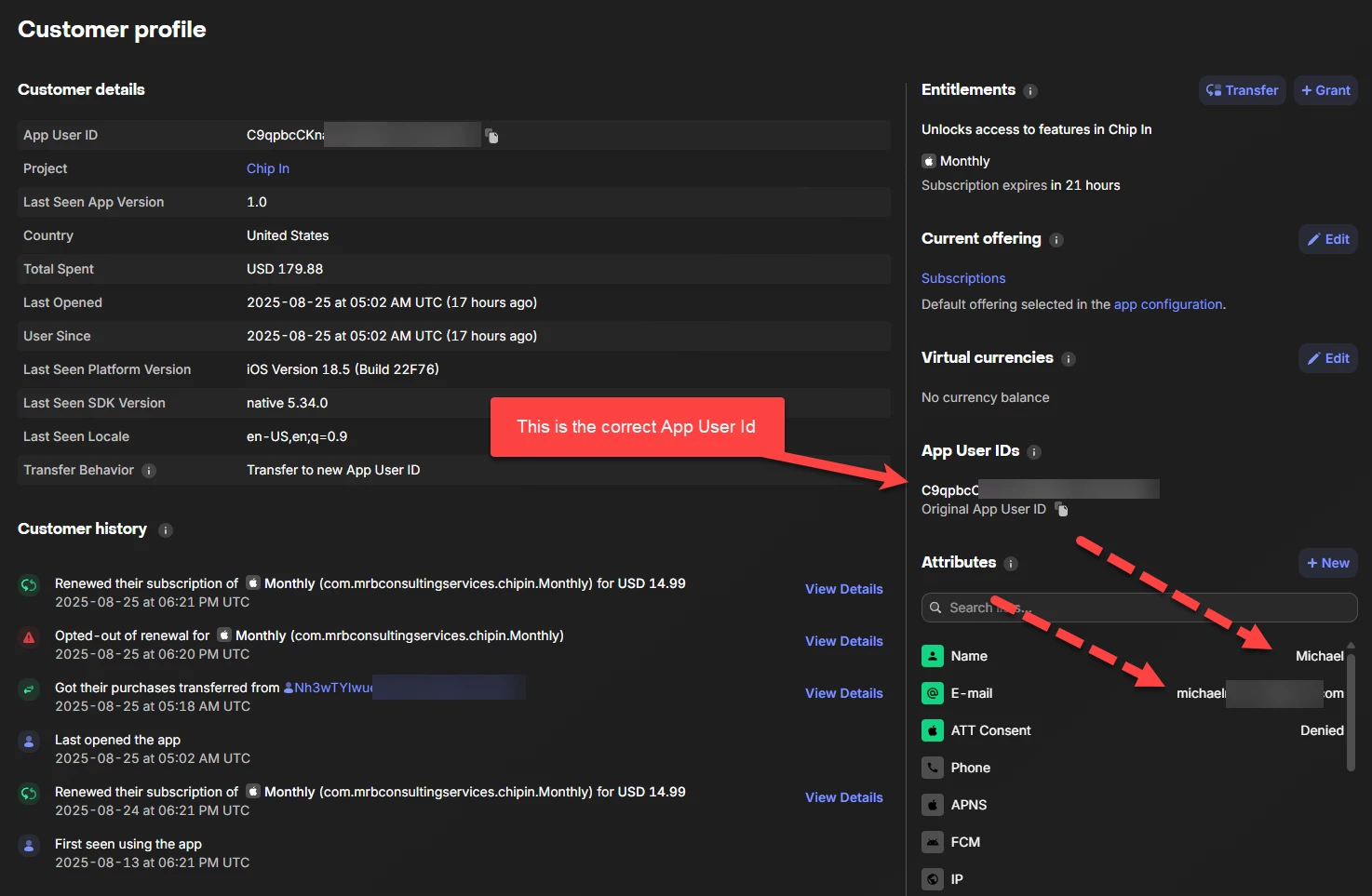
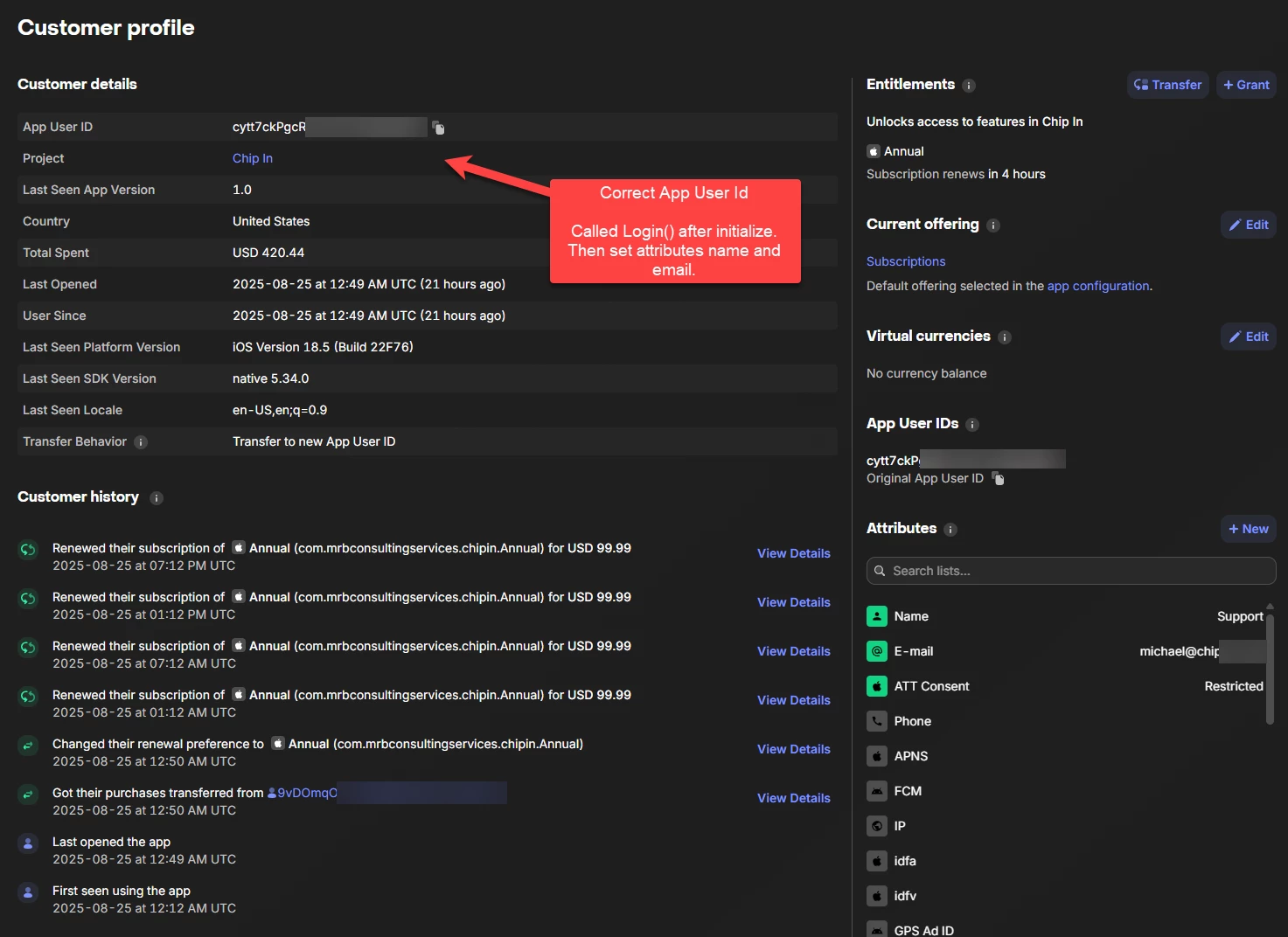
Here are some screenshots of my current testing (this looks much better!!!):
 

I now have two separate users with attributes applied, with two separate app ids (logins), which is great!

You can see User A has attributes applied and the correct App User Id pulled from Google Firebase.  All good!


User B also has his own custom app user id which matches my google firebase UID (great!), and it also has the custom attributes, which now allow me to associate my users much better.


alejandra-wetsch
RevenueCat Staff
Forum|alt.badge.img+6

Hey ​@mrb-consulting-services

Thank you for providing so many details about your setup and providing your troubleshooting steps!

I’m glad you could work this through! If you encounter any other issues related to this, please send us the AppUserID affected so we can troubleshoot further. If you prefer the App User IDs to be shared in a secure channel, I recommend creating a support ticket here

Best, 


Forum|alt.badge.img+3

Thank you Alejandra. I was able to get the app submitted but it was kicked back for subscription issues, some are minor like metadata, but there is one issue that has me a little stumped they mentioned.  I don’t know if it’s a generic message or what.  They said this:

When validating receipts on your server, your server needs to be able to handle a production-signed app getting its receipts from Apple’s test environment. The recommended approach is for your production server to always validate receipts against the production App Store first. If validation fails with the error code "Sandbox receipt used in production," you should validate against the test environment instead.


If I setup all of the API keys, secrets, urls, everything looks good to me.  In my app I can pull my subscription data, from apple, test in Test Flight on real devices.  Is there something I’m missing when it flips to production?  


Forum|alt.badge.img+3

Do these URL’s look correct?  Version 1?  


alejandra-wetsch
RevenueCat Staff
Forum|alt.badge.img+6

Hey ​@mrb-consulting-services
 

This rejection is generally caused when the reviewer can't see the subscription products while reviewing your app. 

Could you please double-check that you have all the agreements signed and valid in the Business section in App Store Connect? Not having them all set, especially the Paid Applications Agreement, can cause product fetching issues and rejections.

The changes can take up to 24 hours to propagate, so it's best to wait 1 day before resubmitting it.

Another thing that has helped developers get Apple approval faster is to attach a video showing your subscription flow working as expected.

Do these URL’s look correct?  Version 1?  

The URL is correct. Version 1 refers to our internal API versioning, not the Apple Server-to-Server Notification version used.

I hope your able to get your app approved soon!