Answer

Seperate Firebase project for production and testing

  • September 2, 2025
  • 3 replies
  • 81 views

onyaga
Forum|alt.badge.img

For anyone who has had to create a secondary Firebase project to support a Production environment seperate from Development. I would love some advice or testimony on what you did.

I am currently assuming that I will create a new environment for prod assumign the one i have setup already is dev

  1. have to create a secondary project in firebase with 3 new apps (1 web,1 ios, 1 android)
  2. I have to create a secondary project in revenueCat linked to the new firebase project
  3. I have to create a new set of ios app/google/stripe play app and recreate the subscription products.

I am a bit unsure if 3 is correct and was wondering if anyone had success using the same apps/purchase products created for both environments in a dual firebase/revenuecat sitch.

Cheers,
Onyaga

Best answer by chris_perriam

@onyaga 

Generally speaking, transactions are received by RevenueCat via our SDK/receipt API or directly from the store via server notifications. Here’s a link to our guides for configuring server notifications for each store.

Regarding your comment:

Whereas I originally thought that Apple was the one first point of contact and would then send the data to RevenueCat and hence would not be able to recognise which project to choose from

This statement is true for server notifications (e.g. Apple can provide us the transaction directly via server notifications), but transactions can also be directly received from the SDK.

Enabling server notifications are highly recommended, as they allow us to receive subscription events that occur when the app is not open (such as renewals).

However, if you are not using server notifications, the configuration of your split environment would be easier. You’d just need to ensure that the correct SDK keys are used (e.g. using the Dev RC Project’s Google Play App SDK Key for sandbox play store purchases).

If you are using server notifications:

Stripe

Ensure that your Sandbox Stripe Account is configured to send webhooks to your Dev RevenueCat Project’s Stripe App.

Ensure that your Production Stripe Account is configured to send webhooks to your Prod RevenueCat Project’s Stripe App.

App Store

In App Store Connect, manually configure the Sandbox Server URL to the URL found in your Dev RevenueCat Project’s App Store App.

In App Store Connect, manually configure the Production Server URL to the URL found in your Prod RevenueCat Project’s App Store App.

Play Store

Unfortunately, I’m not aware of a way to split sandbox and production events to separate RevenueCat projects without creating a separate Play Store app.

--

An overall caveat to a split sandbox/production environment is that careful attention is needed to ensure that you carefully keep track of changes that are being applied to each environment, as they are not automatically kept in sync.


This post has been closed for comments

3 replies

jeffrey_bunn
RevenueCat Staff
Forum|alt.badge.img+6
  • RevenueCat Staff
  • September 4, 2025

@onyaga That’s correct. We have documentation on the various environment strategies you may want to try, which you can find here: https://www.revenuecat.com/docs/guides/environment-strategies. You’re currently describing the “separate projects” approach, which allows full separation but incurs a bit of a complexity cost. Happy to help if you have additional questions.


onyaga
Forum|alt.badge.img
  • Author
  • New Member
  • September 5, 2025

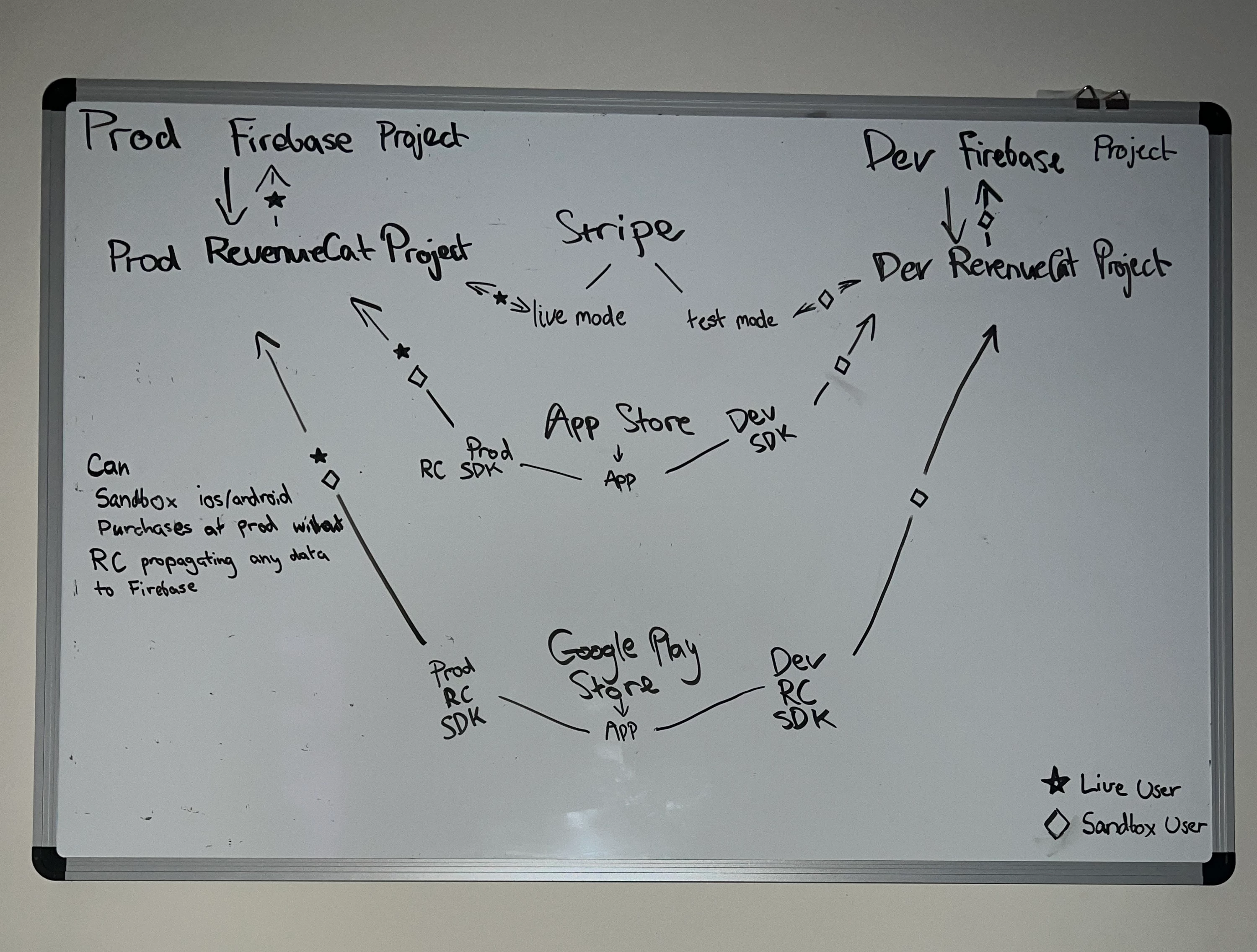
Great, I have already gone to creating a seperate prod firebase project, seperate prod revenuecat project, but using the same app store connect/stripe/google play subscription. 
It’s good to know that I can simply use the same ios subscription keys and android subscription ids across two RC projects.

I was confused due to lacking the understanding that the RC SDK will send the purchase data appropriate RC project where it confirms with Apple’s servers with the receipt. Whereas I originally thought that Apple was the one first point of contact and would then send the data to RevenueCat and hence would not be able to recognise which project to choose from.
Since that’s the case then simply switch the SDK thru env variables is sufficient in deciding the project that receives the purchase

Just confirming this is a viable solution below?
by testmode i meant sandbox mode on stripe


chris_perriam
RevenueCat Staff
Forum|alt.badge.img+6
  • RevenueCat Staff
  • Answer
  • September 11, 2025

@onyaga 

Generally speaking, transactions are received by RevenueCat via our SDK/receipt API or directly from the store via server notifications. Here’s a link to our guides for configuring server notifications for each store.

Regarding your comment:

Whereas I originally thought that Apple was the one first point of contact and would then send the data to RevenueCat and hence would not be able to recognise which project to choose from

This statement is true for server notifications (e.g. Apple can provide us the transaction directly via server notifications), but transactions can also be directly received from the SDK.

Enabling server notifications are highly recommended, as they allow us to receive subscription events that occur when the app is not open (such as renewals).

However, if you are not using server notifications, the configuration of your split environment would be easier. You’d just need to ensure that the correct SDK keys are used (e.g. using the Dev RC Project’s Google Play App SDK Key for sandbox play store purchases).

If you are using server notifications:

Stripe

Ensure that your Sandbox Stripe Account is configured to send webhooks to your Dev RevenueCat Project’s Stripe App.

Ensure that your Production Stripe Account is configured to send webhooks to your Prod RevenueCat Project’s Stripe App.

App Store

In App Store Connect, manually configure the Sandbox Server URL to the URL found in your Dev RevenueCat Project’s App Store App.

In App Store Connect, manually configure the Production Server URL to the URL found in your Prod RevenueCat Project’s App Store App.

Play Store

Unfortunately, I’m not aware of a way to split sandbox and production events to separate RevenueCat projects without creating a separate Play Store app.

--

An overall caveat to a split sandbox/production environment is that careful attention is needed to ensure that you carefully keep track of changes that are being applied to each environment, as they are not automatically kept in sync.