I am trying to set up multiple pricing tiers. For example, I want a paywall that has a toggle to switch between the ‘Plus’ tier and the ‘Pro’ tier. Each tier has an annual and a monthly option. On the paywall page, it only lets me select one offering. But for an offering, I can only assign one product per period (For example, I can only have one product for Apple under the monthly package).
Anyways, I want to be able to have the paywall that switches the offering depending on the toggle. Is this possible? How can I achieve this?

Solved
Paywalls with multiple tiers
 +3
+3Best answer by alejandra-wetsch
Hey
Thank you for reaching out!
You’re correct. Paywalls only support having one Offering attached to them. To offer a multi-tier paywall, add both tier products to the same Offering.
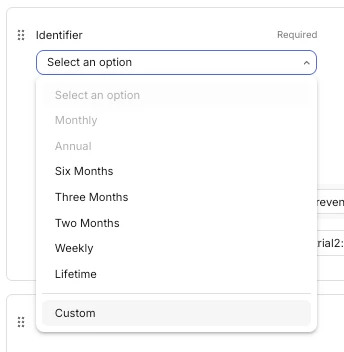
To provide additional context, the Duration dropdown for a Package is actually its identifier. We have added different durations there to make it easier for developers to choose an identifier matching their products' duration. However, we do also offer the possibility to add a custom identifier.
As you mentioned, as you will be adding two products for the same duration to the same offering, you won’t be able to select the same identifier twice. Instead, you should use the Custom dropdown option and add a unique identifier for each product.
The example below is adding two yearly products to the same Offering.
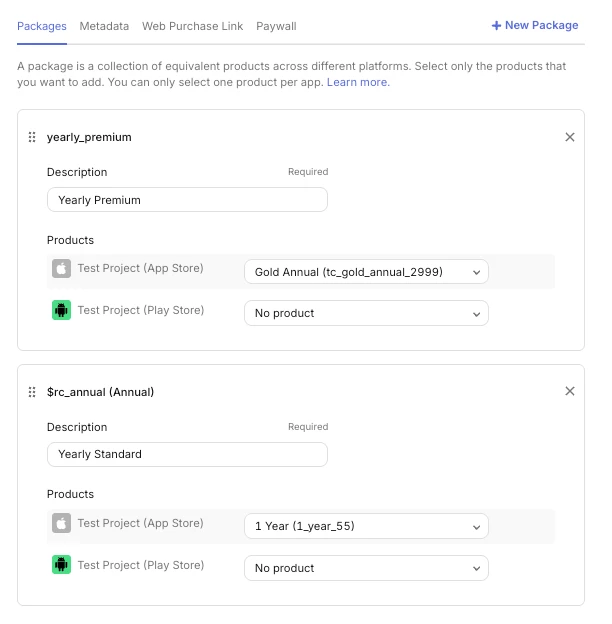
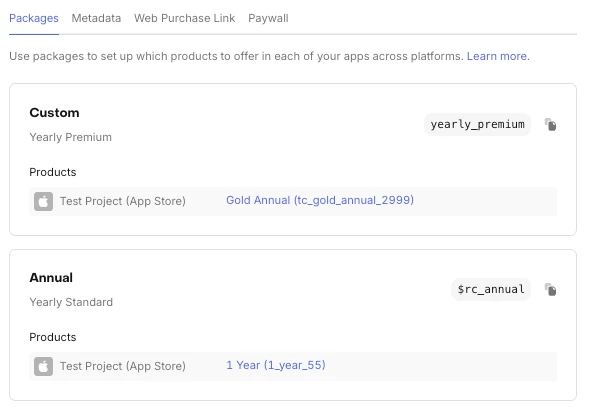
After you’ve configured the Offering, you are ready to use it in the Paywall and select each product on the correct tier.
I hope this helps. Please let us know if you have additional questions!
This post has been closed for comments




Enter your E-mail address. We'll send you an e-mail with instructions to reset your password.