
Solved

Paywall v2 rendering issues on multiple Android devices

  • July 31, 2026
  • 2 replies
  • 27 views

Forum|alt.badge.img+7

Hi RevenueCat team,

We've been testing the new Paywall v2 and have encountered rendering issues on several devices.

The paywall displays correctly on some devices (for example, an iPhone 14 Pro), but on several Android phones the layout breaks in different ways.

We've observed the following issues:

  • The pricing selection card becomes too tall and pushes the Continue button and footer links off-screen.
  • On some devices, the Restore Purchases link is rendered vertically, one character per line.
  • On others, the pricing card overlaps the feature list above it.
  • The behavior appears to vary by device and screen size rather than by our implementation.

We've attached screenshots from several devices demonstrating the issue:

  • Samsung A51
  • Samsung S24 (English)
  • Samsung S24 (French)
  • Samsung Z Fold3
  • iPhone 14 Pro (working as expected)

We are using the standard Paywall v2 template without significant layout customization, so this appears to be a rendering issue in the paywall itself.

Could you let us know:

  1. Whether this is a known issue with Paywall v2?
  2. Whether there are any recommended workarounds?
  3. If a fix is planned?

Please let us know if you need additional information.
Best answer by guilherme

Hey ​@soscuisine !

The Paywall (and its components) are built and rendered natively on each platform (SwiftUI on iOS, Jetpack Compose on Android), so each platform has its own structure for laying out and rendering them. Because of that, we recommend leaving sizing dynamic (fit/fill rather than fixed values) where you can, so components adjust to each screen as best as they can. Even then, with so many devices and system settings out there, a paywall usually needs some tweaking and sanity checking on real devices, to be sure it’s well fitting in them all.

Looking at your shared screenshots, it suggests that a larger system font size (and possibly display size) set on the affected devices, which seems to be common on Samsung - text scales up with that setting, but fixed-size containers don't grow with it, so the pricing text wraps inside its box. In these cases, it can make the card grows and pushes the button down, and the footer links squeeze "Restore Purchases" until it renders one character per line. French (or other langauges) makes it more visible simply because the Strings of text are longer. 

A few things to try to get around this could be to:

  • for the footer links, avoid three fit-width texts competing for one row. Set them to fill with equal distribution so they wrap gracefully, or move Restore Purchases to its own row;
  • set the pricing text's container to fill width and fit height, so scaled text wraps and grows the box instead of being cut off;
  • keep the content above the pricing card in a scrollable stack, so it scrolls instead of overlapping when the bottom section grows;
  • sanity check on a device with Font size and Display size at max before republishing.

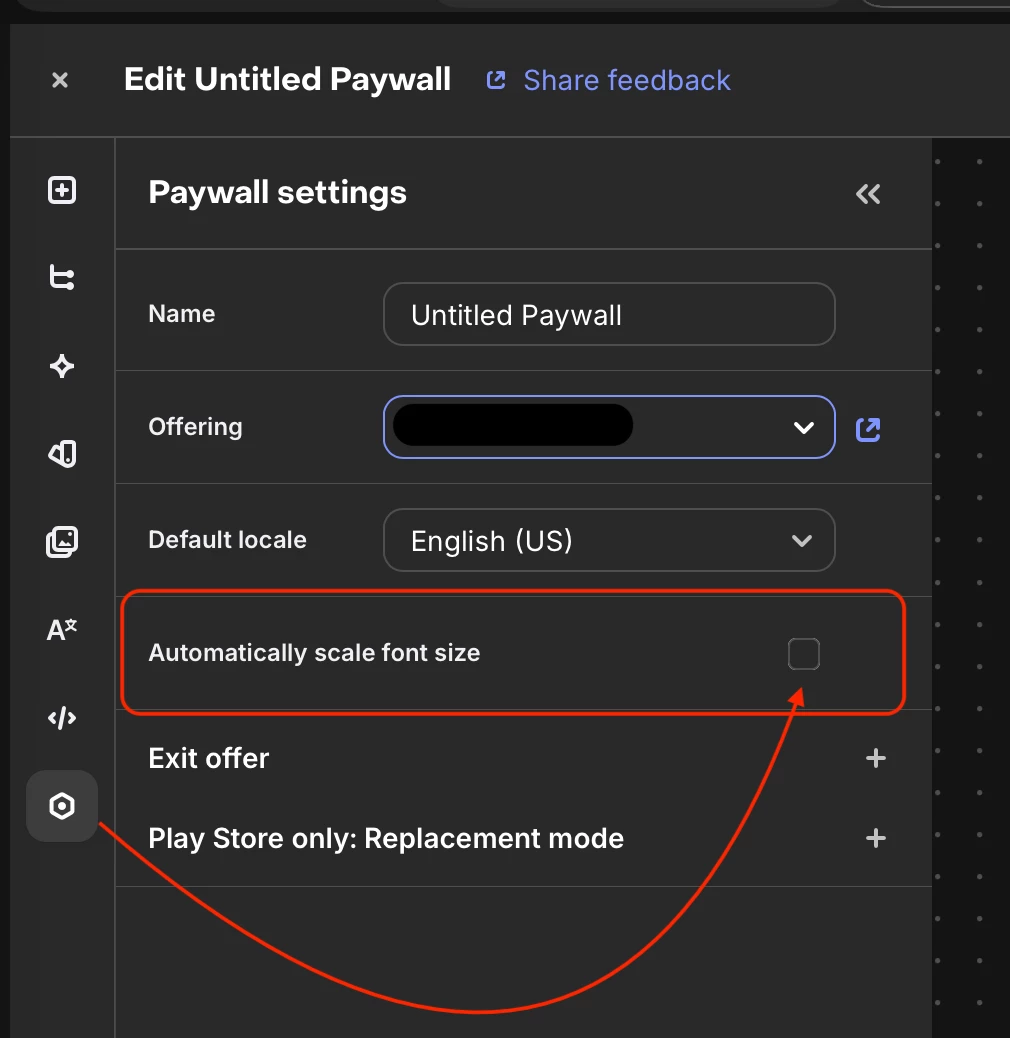
There's also an "Automatically scale font size" option in the paywall editor's Settings panel:

Paywall settings

Unchecking it makes the paywall keep your designed font sizes instead of scaling with the device setting, which sidesteps this whole class of layout issues, though it means the paywall won't follow the user's accessibility font preference, so weigh that for your audience! 

One important note to consider, this it only takes effect on devices running react-native-purchases 10.1.2 or later, so check your current SDK version first.

Let me know if this helps!

2 replies

guilherme
RevenueCat Staff
Forum|alt.badge.img+6
  • RevenueCat Staff
  • Answer
  • August 4, 2026

Hey ​@soscuisine !

The Paywall (and its components) are built and rendered natively on each platform (SwiftUI on iOS, Jetpack Compose on Android), so each platform has its own structure for laying out and rendering them. Because of that, we recommend leaving sizing dynamic (fit/fill rather than fixed values) where you can, so components adjust to each screen as best as they can. Even then, with so many devices and system settings out there, a paywall usually needs some tweaking and sanity checking on real devices, to be sure it’s well fitting in them all.

Looking at your shared screenshots, it suggests that a larger system font size (and possibly display size) set on the affected devices, which seems to be common on Samsung - text scales up with that setting, but fixed-size containers don't grow with it, so the pricing text wraps inside its box. In these cases, it can make the card grows and pushes the button down, and the footer links squeeze "Restore Purchases" until it renders one character per line. French (or other langauges) makes it more visible simply because the Strings of text are longer. 

A few things to try to get around this could be to:

  • for the footer links, avoid three fit-width texts competing for one row. Set them to fill with equal distribution so they wrap gracefully, or move Restore Purchases to its own row;
  • set the pricing text's container to fill width and fit height, so scaled text wraps and grows the box instead of being cut off;
  • keep the content above the pricing card in a scrollable stack, so it scrolls instead of overlapping when the bottom section grows;
  • sanity check on a device with Font size and Display size at max before republishing.

There's also an "Automatically scale font size" option in the paywall editor's Settings panel:

Paywall settings

Unchecking it makes the paywall keep your designed font sizes instead of scaling with the device setting, which sidesteps this whole class of layout issues, though it means the paywall won't follow the user's accessibility font preference, so weigh that for your audience! 

One important note to consider, this it only takes effect on devices running react-native-purchases 10.1.2 or later, so check your current SDK version first.

Let me know if this helps!


Forum|alt.badge.img+7
  • Author
  • Helper
  • August 5, 2026

Thank you ​@guilherme , with your help we were able to improve the layout.