

Question

Need Urgent Help – Google Play Service Credentials Setup Not Working

  • December 4, 2025
  • 1 reply
  • 27 views

Forum|alt.badge.img

We’re trying to set up Google Play service credentials for our Android app, strictly following the steps in this guide:
https://www.revenuecat.com/docs/service-credentials/creating-play-service-credentials

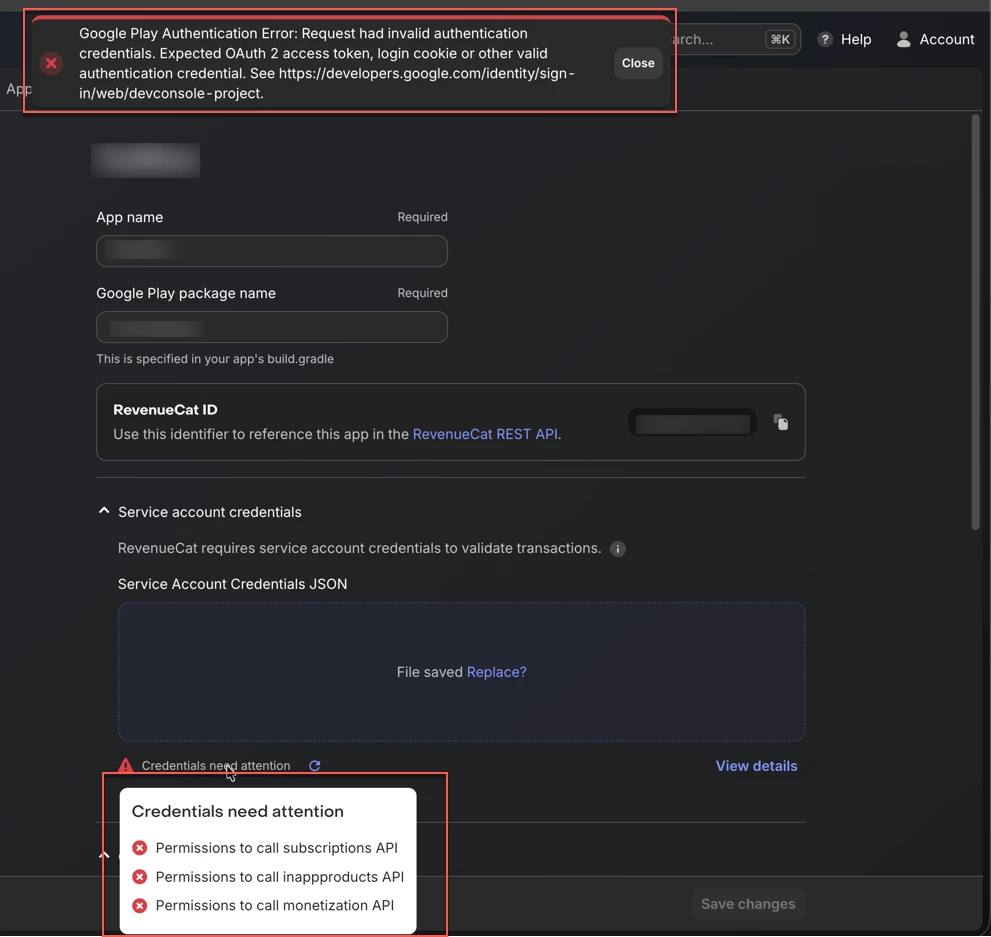
However, we are running into issues (see attached screenshot). 

We’re unsure whether this is caused by missing console permissions, a setup sequence issue, or something else in the Play Console UI (which looks different from the screenshots in the documentation).

We need urgent help to resolve this so we can move forward with in-app purchases.

Thank you!


1 reply

Forum|alt.badge.img+8
  • RevenueCat Staff
  • December 8, 2025

Hi ​@jsingh checking your project I can see that these have now been validated. Usually Google needs time to do so ~36 hours, but some devs have reported it can take up to a week. For anyone else experiencing this, please also make sure to check the following:

  • For your inappproducts and monetization permission check our troubleshooting guide here to make sure these are properly enabled.
  • Make sure that you have uploaded your signed APK or Android App Bundle and have completed all the steps to approve the release, not doing so can result in your credentials and permissions not being validated.
  • You can try and make a test purchase as this could jumpstart the validation and we have a workaround to get them validated faster here.


