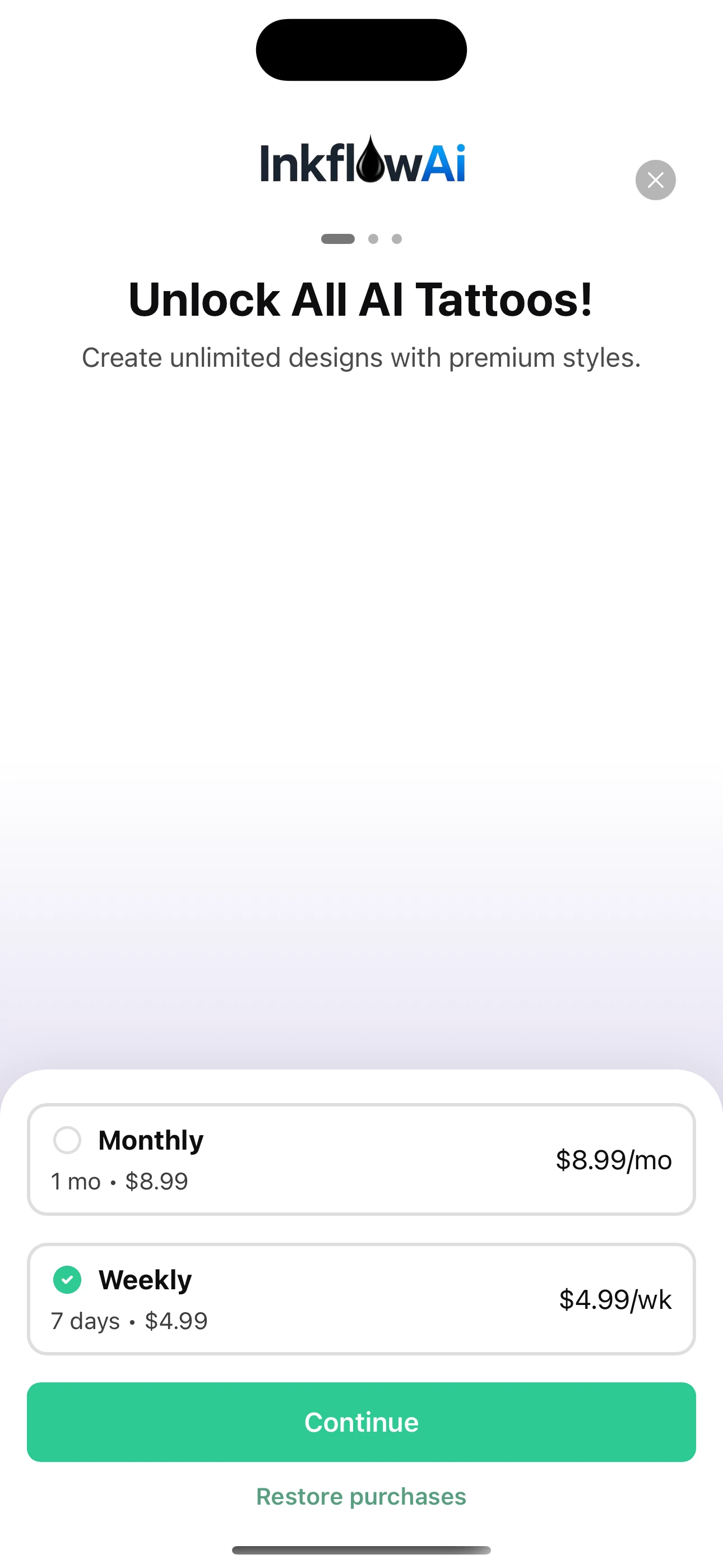
Question

Images not displaying on paywall - iOS

  • October 14, 2025
  • 5 replies
  • 76 views

Forum|alt.badge.img

My paywall is displaying completely fine. The issue is that the images I used on the dashboard are not populating on the actual paywall on my device. The images are blank. Not sure how to fix… any help is appreciated.

5 replies

joan-cardona
RevenueCat Staff
Forum|alt.badge.img+6
  • RevenueCat Staff
  • 571 replies
  • October 16, 2025

Hi ​@c71803,

I’ve used your bundle id and API key in my sample app to check your paywall and I could see the images loading correctly. They took a second to load the first time since they might be a bit heavy but I could see it working correctly. Which SDK version are you using? I tried on the latest purchases-ios one and using a simulator.


Best,


Forum|alt.badge.img+2

Same issues on my physical and Simulator
i used both png, jpg, jpeg format 
dep details

"expo": "54.0.13",
"react-native": "0.81.4",

"react-native-purchases": "^9.5.4",

"react-native-purchases-ui": "^9.5.4",


any solution please


  • New Member
  • 3 replies
  • October 23, 2025

update to expo js package works for me
 

"react-native-purchases": "9.6.0",

"react-native-purchases-ui": "9.6.0",


react-native-purchases:

specifier: 9.6.0

version: 9.6.0(react-native@0.81.4)(react@19.1.0)

react-native-purchases-ui:

specifier: 9.6.0

version: 9.6.0(react-native-purchases@9.6.0)(react-native@0.81.4)(react@19.1.0)


Forum|alt.badge.img+2

update to expo js package works for me
 

"react-native-purchases": "9.6.0",

"react-native-purchases-ui": "9.6.0",


react-native-purchases:

specifier: 9.6.0

version: 9.6.0(react-native@0.81.4)(react@19.1.0)

react-native-purchases-ui:

specifier: 9.6.0

version: 9.6.0(react-native-purchases@9.6.0)(react-native@0.81.4)(react@19.1.0)

Thanks worked for me 


joan-cardona
RevenueCat Staff
Forum|alt.badge.img+6
  • RevenueCat Staff
  • 571 replies
  • October 31, 2025

Hi ​@devsphere-24452e,

Upgrading to the latest SDK version should work!


Best,