Solved

How to show default offering pricing on exit offering (React Native Paywall View)

  • February 18, 2026
  • 3 replies
  • 83 views

Forum|alt.badge.img+2

"react-native-purchases": "^9.10.0",

"react-native-purchases-ui": "^9.10.0",


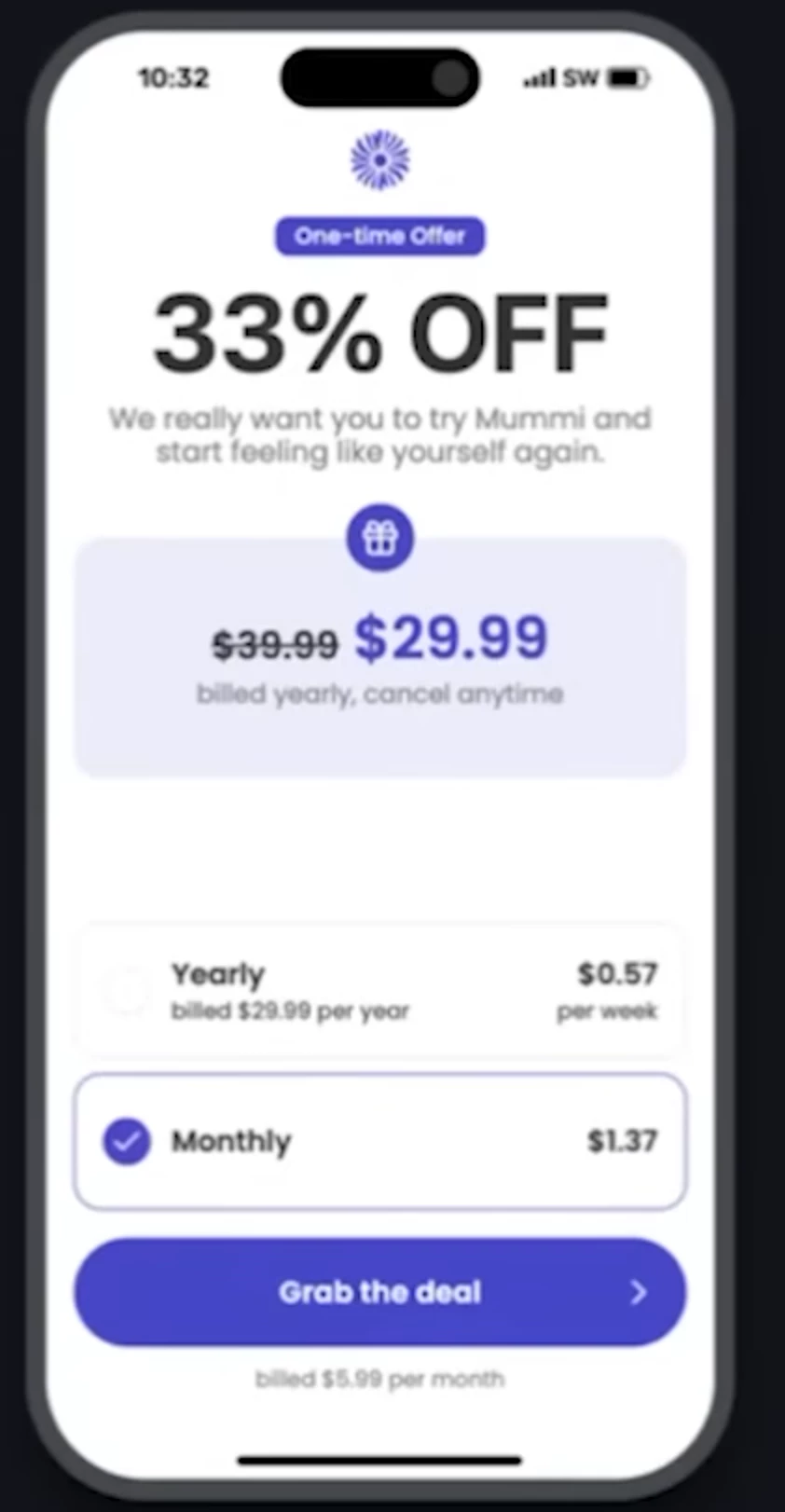
Hi I am using React Native Expo and displaying my paywall using RevenueCatUI.Paywall. I have a default offering setup and linked to a default paywall. I have also just created an exit offer offering and am setting up a new paywall for this. I would like the the exit offer paywall to show the default offering pricing so that I can cross out the default pricing and display the discounted exit offering pricing next to it. How can I accomplish this? This seems like a fairly standard thing a paywall would display but I can’t figure out how to show default offering pricing on my exit offer offering paywall.

Example of the type of exit offer paywall I am trying to create is below. 


Best answer by Tarek

Hello there!


I'm Tarek, from the support team, and I'll happily help you figure this out.


Currently, paywalls are associated to a single offering, so you cannot reference products from other offerings or packages "out-of-the-box". I raised your request with engineering to consider adding this feature.


However, in the meantime, there is a way to achieve this result by relying on custom variables and injection in paywalls.

You could do the following:

  • Create a custom variable in your exit offer paywall (name it for instance default_monthly_price and give it a default value). Reference this custom variable in your exit offer paywall wherever you want to display the original price by using {{ custom.default_monthly_price }}
  • In you code, right before displaying your paywall, fetch your default offering and pull your monthly price from it
  • Inject this monthly price in your exit_offer paywall right before displaying it
  • Your exit offer paywall with then display this value where your have referenced it since it's been injected

Since you said you were using ReactNative, here's a sample code to help you get started:

// Fetch offerings, inject the custom variable and show the paywall
async function showPremiumPaywall() {
const offerings = await Purchases.getOfferings();
const defaultOffering = offerings.all["default"];
const premiumOffering = offerings.all["premium"];

if (!premiumOffering) return;

const monthlyPrice =
defaultOffering?.monthly?.product.priceString ?? "";

await RevenueCatUI.presentPaywall({
offering: premiumOffering,
customVariables: {
default_monthly_price: monthlyPrice,
},
});
}

// You can also show the paywall and inject the custom variable declaratively (fell free to adapt fetching in this case)
<RevenueCatUI.Paywall
options={{
offering: premiumOffering,
customVariables: {
default_monthly_price: monthlyPrice,
},
}}
onDismiss={() => setShowPaywall(false)}
/>

I hope this is helpful.


Best regards,

This post has been closed for comments

3 replies

Tarek
RevenueCat Staff
Forum|alt.badge.img+3
  • RevenueCat Staff
  • Answer
  • February 19, 2026

Hello there!


I'm Tarek, from the support team, and I'll happily help you figure this out.


Currently, paywalls are associated to a single offering, so you cannot reference products from other offerings or packages "out-of-the-box". I raised your request with engineering to consider adding this feature.


However, in the meantime, there is a way to achieve this result by relying on custom variables and injection in paywalls.

You could do the following:

  • Create a custom variable in your exit offer paywall (name it for instance default_monthly_price and give it a default value). Reference this custom variable in your exit offer paywall wherever you want to display the original price by using {{ custom.default_monthly_price }}
  • In you code, right before displaying your paywall, fetch your default offering and pull your monthly price from it
  • Inject this monthly price in your exit_offer paywall right before displaying it
  • Your exit offer paywall with then display this value where your have referenced it since it's been injected

Since you said you were using ReactNative, here's a sample code to help you get started:

// Fetch offerings, inject the custom variable and show the paywall
async function showPremiumPaywall() {
const offerings = await Purchases.getOfferings();
const defaultOffering = offerings.all["default"];
const premiumOffering = offerings.all["premium"];

if (!premiumOffering) return;

const monthlyPrice =
defaultOffering?.monthly?.product.priceString ?? "";

await RevenueCatUI.presentPaywall({
offering: premiumOffering,
customVariables: {
default_monthly_price: monthlyPrice,
},
});
}

// You can also show the paywall and inject the custom variable declaratively (fell free to adapt fetching in this case)
<RevenueCatUI.Paywall
options={{
offering: premiumOffering,
customVariables: {
default_monthly_price: monthlyPrice,
},
}}
onDismiss={() => setShowPaywall(false)}
/>

I hope this is helpful.


Best regards,


Forum|alt.badge.img+2
  • Author
  • New Member
  • February 23, 2026

Great thanks ​@Tarek 


Tarek
RevenueCat Staff
Forum|alt.badge.img+3
  • RevenueCat Staff
  • February 23, 2026

You're welcome Malina!