Question

Does Test Store work in iOS simulator?

  • March 7, 2026
  • 1 reply
  • 36 views

Forum|alt.badge.img

I keep getting the error: “Error fetching offerings - The operation couldn’t be completed” after setting up the Test store with products. I have the message “RevenueCat SDK is configured correctly”

Does Test Store work at all in the iOS simulator or do I still need to use StoreKit set-up?

1 reply

matt-heaney
RevenueCat Staff
Forum|alt.badge.img+3
  • RevenueCat Staff
  • March 9, 2026

Hey there,


Matt from RevenueCat here! Thanks for the question, I’d love to help with this!


Yes, the Test Store does work in the iOS simulator, and this shouldn’t require any additional configuration such as setting up a StoreKit configuration file.


To use the Test Store for iOS, you need to be running at least SDK version 5.43.0 (all required SDK versions for the Test Store can be found here).


You also need to use your Test Store API key when configuring the SDK in your code. This can be found in your RevenueCat dashboard under “Apps & Providers”, and it will start with “test_”. It’s important to switch this back to your non-test API key when uploading your app to TestFlight or releasing it on the App Store.


To help you get up and running quickly, I’ve taken a look at your account to see if there could be any causes for this, and I think I may have found one.


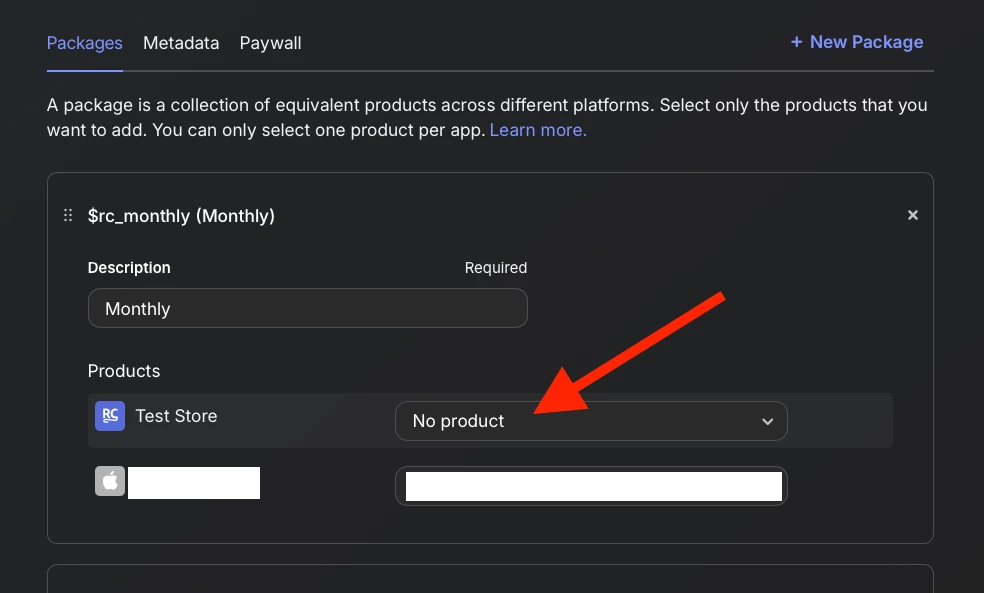
Your default offering currently does not include any Test Store products, and only contains iOS products.


When using the Test Store, even on iOS, it fetches items from Test Store products in packages within offerings, not from the iOS products. This could cause the error you’re seeing, as the Test Store doesn’t have any products to fetch from these offerings.


To update this, head into your app in the dashboard, go to the Product Catalog, and then into your offering. From there, select Edit and add Test Store products to the packages.


After making sure:

  • the SDK version is high enough

  • the Test Store API key is being used

  • Test Store products are included in the packages within the offering

give the app another run and you should hopefully be good to go!


If not, let me know and we’ll keep digging. We’ll get this sorted!


Hope this helps!