Tarek from the RevenueCat Support Team here, happy to assist you!
I understand that your Google Play Store credentials couldn't be fully validated. I'm sorry that this is happening, but I will help you sort this out.
Going through the process of setting up the Play Store credentials can be frustrating, as this involves many steps and leaves room for error.
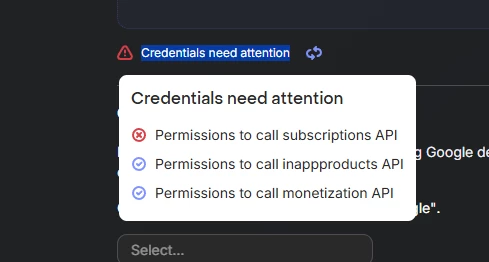
I see that you already have two out of three permissions validated, that's a good start. 🙂
The only permission that is not validated yet in the one allowing to call subscriptions API.
I suggest you double check the Pub/Sub role permission role.
Feel free to go again through the documentation linked below, while paying extra attention to the Pub/Sub role, sometimes you need to set it as admin instead of editor:
While the Pub/Sub Editor role should be enough in most cases, some developers have reported permission errors when creating topics with that role. If you run into issues, try using the Pub/Sub Admin role instead.
You can take a look at the following pages that could help you spot if something is wrong:
Our new Codelab recently made available, it should give you more details on each step.
Finally, do not hesitate to double-check everything against our Google Play Checklist, it should help you pinpoint any missing step.
As an additional consideration, Google credentials can take up to 36 hours to be successfully validated. If you have confirmed that all permissions and requirements are correctly set up and that your credentials were created within that time frame, waiting may be the best approach.
If something is unclear, do not hesitate to share screenshots of your setup on Google with me and any details that might help. Feel free to open a ticket to share those privately to avoid leaking any confidential info. I'll happily investigate and help you validate this configuration.