


Solved

Configuration Error (Code 23) when integrating subscriptions with RevenueCat

  • March 14, 2026
  • 1 reply
  • 11 views

Maxwellrios
Forum|alt.badge.img+1

Hello,

I am encountering the well-known readable_error_code: CONFIGURATION_ERROR (code: 23) while implementing subscriptions on iOS.

I have already performed several checks to identify the cause of the issue, and so far all configurations appear to be correct:

  • All contracts in App Store Connect have been properly signed.

  • The product identifiers match exactly between App Store Connect and RevenueCat.

  • All required metadata and configurations have been completed.

  • The backend integration has been finalized and appears to be working as expected.

We also performed tests on physical devices (iPad and iPhone) running iOS 26.2.1, and the error still occurs when attempting to fetch the products.

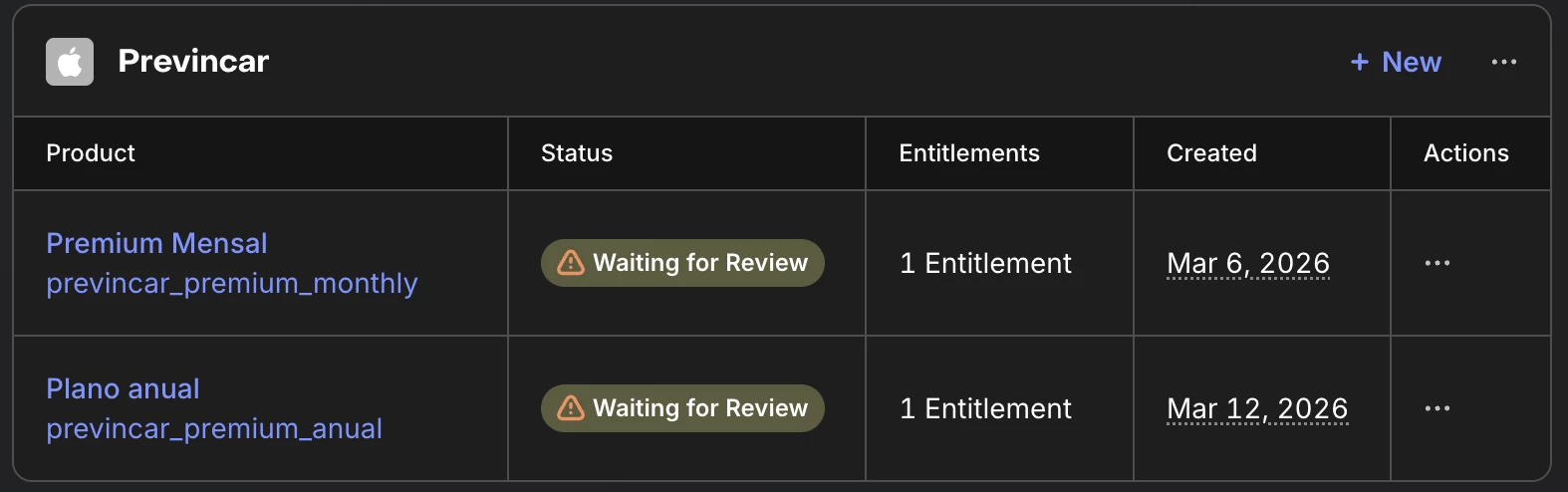
The only potential issue I can identify is the subscription status. The products are currently listed as “Waiting for Review” in App Store Connect and also appear with the same status in the RevenueCat dashboard.

Because of this, I would like to confirm whether this status could prevent the purchases from working correctly or cause the configuration error mentioned above.

As an additional reference, the same implementation on Android has been completed successfully and is working normally without any errors.

Thank you in advance for your assistance. I look forward to your guidance on how to resolve this issue.

 

Best answer by Maxwellrios

[SOLVED] The "Waiting for Review" myth and the unexpected culprit behind Code 23

Hello everyone! Following up on my own post because I finally solved this after hours of intense debugging, and I want to leave the solution here to save the sanity of anyone facing the exact same issue.

Spoiler alert: The fact that the products are in "Waiting for Review" status in App Store Connect does NOT prevent them from being fetched in the Sandbox environment. As long as your "Paid Apps" agreement is active, they should appear.

If you have already double-checked the classic checklist:

  • ✅ App Store Connect "Paid Apps" agreement is Active (Green).

  • ✅ In-App Purchase capability is added to the Xcode target.

  • ✅ Product IDs match perfectly between RevenueCat and App Store Connect (no trailing spaces).

  • ✅ Testing on a real physical device, not a Simulator.

And you are still getting CONFIGURATION_ERROR (code: 23) and empty offerings, check your API Key injection at runtime.

The Root Cause:

In my case, my Flutter app handles both Android and iOS, and it dynamically loads the API keys from a .env file based on the platform. Due to a misconfiguration in my environment variables, the app was injecting a test key (test_...) into the iOS initialization instead of the correct public iOS key (appl_...).

Because the SDK received an invalid/test key, it couldn't fetch the iOS products, resulting in the app throwing the Code 23 error and complaining about "empty offerings".

The Bulletproof Test to find out if this is happening to you:

Before you blame Apple's Sandbox or Xcode's StoreKit configuration, put a massive, unmissable print statement right before you configure the RevenueCat SDK to see the exact string being passed:

Dart


// Check exactly what is being passed to the SDK
print('🔥 EXACT KEY BEING PASSED TO IOS: "$revenueCatApiKey"');

await Purchases.configure(PurchasesConfiguration(revenueCatApiKey));

What to look for in the console:

  • "test_..." -> You are passing a test key. It will fail.

  • "goog_..." -> You are passing your Android key to iOS. It will fail.

  • ""appl_..."" or " appl_... " -> Your .env generator is adding literal quotes or spaces to the string. It will fail.

  • "appl_1a2b3c4d5e6f7h..." -> This is what it should look like (a clean string with the iOS key).

Once I hardcoded the correct appl_... key directly into the configuration to bypass my .env logic, the products loaded instantly and the paywall appeared.

Hope this helps someone out there fighting the Code 23 boss!


1 reply

Maxwellrios
Forum|alt.badge.img+1
  • Author
  • Helper
  • Answer
  • March 14, 2026

[SOLVED] The "Waiting for Review" myth and the unexpected culprit behind Code 23

Hello everyone! Following up on my own post because I finally solved this after hours of intense debugging, and I want to leave the solution here to save the sanity of anyone facing the exact same issue.

Spoiler alert: The fact that the products are in "Waiting for Review" status in App Store Connect does NOT prevent them from being fetched in the Sandbox environment. As long as your "Paid Apps" agreement is active, they should appear.

If you have already double-checked the classic checklist:

  • ✅ App Store Connect "Paid Apps" agreement is Active (Green).

  • ✅ In-App Purchase capability is added to the Xcode target.

  • ✅ Product IDs match perfectly between RevenueCat and App Store Connect (no trailing spaces).

  • ✅ Testing on a real physical device, not a Simulator.

And you are still getting CONFIGURATION_ERROR (code: 23) and empty offerings, check your API Key injection at runtime.

The Root Cause:

In my case, my Flutter app handles both Android and iOS, and it dynamically loads the API keys from a .env file based on the platform. Due to a misconfiguration in my environment variables, the app was injecting a test key (test_...) into the iOS initialization instead of the correct public iOS key (appl_...).

Because the SDK received an invalid/test key, it couldn't fetch the iOS products, resulting in the app throwing the Code 23 error and complaining about "empty offerings".

The Bulletproof Test to find out if this is happening to you:

Before you blame Apple's Sandbox or Xcode's StoreKit configuration, put a massive, unmissable print statement right before you configure the RevenueCat SDK to see the exact string being passed:

Dart


// Check exactly what is being passed to the SDK
print('🔥 EXACT KEY BEING PASSED TO IOS: "$revenueCatApiKey"');

await Purchases.configure(PurchasesConfiguration(revenueCatApiKey));

What to look for in the console:

  • "test_..." -> You are passing a test key. It will fail.

  • "goog_..." -> You are passing your Android key to iOS. It will fail.

  • ""appl_..."" or " appl_... " -> Your .env generator is adding literal quotes or spaces to the string. It will fail.

  • "appl_1a2b3c4d5e6f7h..." -> This is what it should look like (a clean string with the iOS key).

Once I hardcoded the correct appl_... key directly into the configuration to bypass my .env logic, the products loaded instantly and the paywall appeared.

Hope this helps someone out there fighting the Code 23 boss!

