

Question

Apple Rejects Distinct iOS Subscription Groups for Experiment

  • February 1, 2026
  • 5 replies
  • 31 views

Forum|alt.badge.img+3

Per https://www.revenuecat.com/docs/tools/experiments-v1/creating-offerings-to-test, we created different subscription groups: https://i.imgur.com/9eIRy0Y.jpeg

We’re only using “Asr All Acces” pricing, but we want to experiment with the “Asr All Access ($3/mo $30/yr)” and “Asr All Access ($4/mo $40/yr)” subscription group pricing.


Apple rejected this 😐


Any suggestions on working around this? Is different subscription groups still the best way to experiment with pricing?

See below for Apple’s reason:


Guideline 2.1 - Performance - App Completeness

Issue Description

In-app purchase products associated with the app version submitted for review, such as All Access (1 month) ($3), All Access (1 month) ($4), All Access (1 year) ($30), All Access (lifetime) ($50), All Access (1 year) ($40), and All access lifetime ($49.99), could not be found in the submitted binary.

Next Steps

If you do not want to make these in-app purchase products available at this time, remove the unused in-app purchase products you’ve created from App Store Connect.

If you want to make these in-app purchase products available at this time:
- Ensure the products are active and that you have implemented StoreKit in your app. If you have not, submit a new binary for review with these changes.
- Resubmit the in-app purchase products if they are in the Developer Action Required State. You must edit the detail information or cancel the request to change the detail information before the in-app purchase products can be reviewed again.

If you’ve already implemented StoreKit and enabled these in-app purchase products, reply to this message and explain where these can be found in the app.

Resources

- For more information on how to implement in-app purchase in your app, please refer to the In-App Purchase Programming Guide.
- Learn more about offering in-app purchases in App Store Connect Help.


Guideline 3.1.2 - Business - Payments - Subscriptions


We noticed that the different subscription products of your auto-renewable subscriptions were created as separate in-app purchase products, rather than as different subscription products within the same subscription group.

Next Steps

To resolve this issue, please revise your auto-renewable subscriptions to offer the different subscription products within the same group. Offering different subscription products at different levels within the same group allows customers to upgrade, downgrade, and crossgrade between similar subscription products.

Resources

Learn more about auto-renewable subscription groups in App Store Connect Help and review auto-renewable subscription groups to discover more best practices on the Apple Developer website.

5 replies

Tarek
RevenueCat Staff
Forum|alt.badge.img+1
  • RevenueCat Staff
  • February 4, 2026

Hey Andrew,


Thank you for reaching out. I'm Tarek, from the support team.

I'm sorry that your app got rejected, I'll happily help you figure this out.


You are right that we do recommend mapping different offerings to different subscription groups.

In your specific case, I can see that you only have one set of three products, which are used in both of your offerings.

This means that both offerings are virtually the same.

Additionally, subscription groups should usually be used to group together subscriptions that can be tied together (allowing upgrades/downgrades). Once again is your case, where duration is the differentiating factor, subscriptions are usually grouped together.


An instance where subscription groups might be used is the following:

  • You have monthly, yearly, lifetime subscriptions at pricing A
  • You want to have a second offering with also monthly, yearly, lifetime subscriptions but at pricing B (and perhaps different features)


To get your app approved and moving forward, I suggest that you keep your subscriptions in the same subscription group, unless you want to experiment with similar products but at different pricing for instance as explain above. You would then leverage offerings. (I'm suggesting this based on the products you have imported so far, feel free to adapt in case you create other products).

If you do create multiple offerings, do not hesitate to make that known to app review when submitting your app, to help them understand why you created different subscription groups.


Otherwise, you can definitely create different offerings even if the subscriptions are in the same subscription group.


Regarding the second rejection, it's likely because you submitted all three subscriptions along with the app, but your paywall shows only one of those as you said. Apple would need the ability to see and test all subscriptions that you submit with an app to validate them.


I hope this is useful, do not hesitate if I can help you further.


Best regards,


--

Tarek, Developer Support Engineer at RevenueCat


Forum|alt.badge.img+3

Thank you for the help Tarek!


> This means that both offerings are virtually the same.


We put the experimentation on pause and removed the new subscription groups from App Store Connect. :( We never made a new offering for the variant price B because we never got approved for subscription group with prices B.


But we do want to test different prices. And you’re saying that while the app is in review after creating the new subscription group, we need to have an offering ready using that in-review-subscription group. Is that right?


> Apple would need the ability to see and test all subscriptions that you submit with an app to validate them.

So you’re proposing the following to test price A ($5/mo, $50/yr) and price B ($3/mo, $30/yr). Please correct me if I’m wrong

  1. Have two subscription groups. Subscription group A has prices A, and subscription group B has prices B
  2. Make sure subscription group B is “ready for submission” status in App Store Connect. Subscription group A is already approved and live since that’s our current prices
  3. Sync RevenueCat with App Store Connect so it pulls in subscription group B prices, and have two offerings in RevenueCat: offering A shows price A from subscription group A, offering B shows price B from subscription group B
  4. DO NOT create experiments just with offering B, since that is not approved yet (right??)
  5. Create two test accounts for Apple: one that is configured to show offer B, and another that is configured to offering B (how do I do this?)
  6. Send the app for review, communicating the two accounts


Are my instructions above correct? I’m most confused about step 4 and 5.


Tarek
RevenueCat Staff
Forum|alt.badge.img+1
  • RevenueCat Staff
  • February 5, 2026

Hey Andrew,


No worries, the pleasure is all mine!


But we do want to test different prices. And you’re saying that while the app is in review after creating the new subscription group, we need to have an offering ready using that in-review-subscription group. Is that right?


You should submit your new subscriptions the new subscription group along with your new app version so that they're reviewed together.


Are my instructions above correct? I’m most confused about step 4 and 5.


Yes, the instructions are correct. Instead of creating two test accounts, I suggest using targeting, and filtering by app version (the newest one), to show the offering with subscription B during app review. This way, Apple's app reviewer will only see the new subscriptions from group B. (Since subscriptions from group A are already approved).

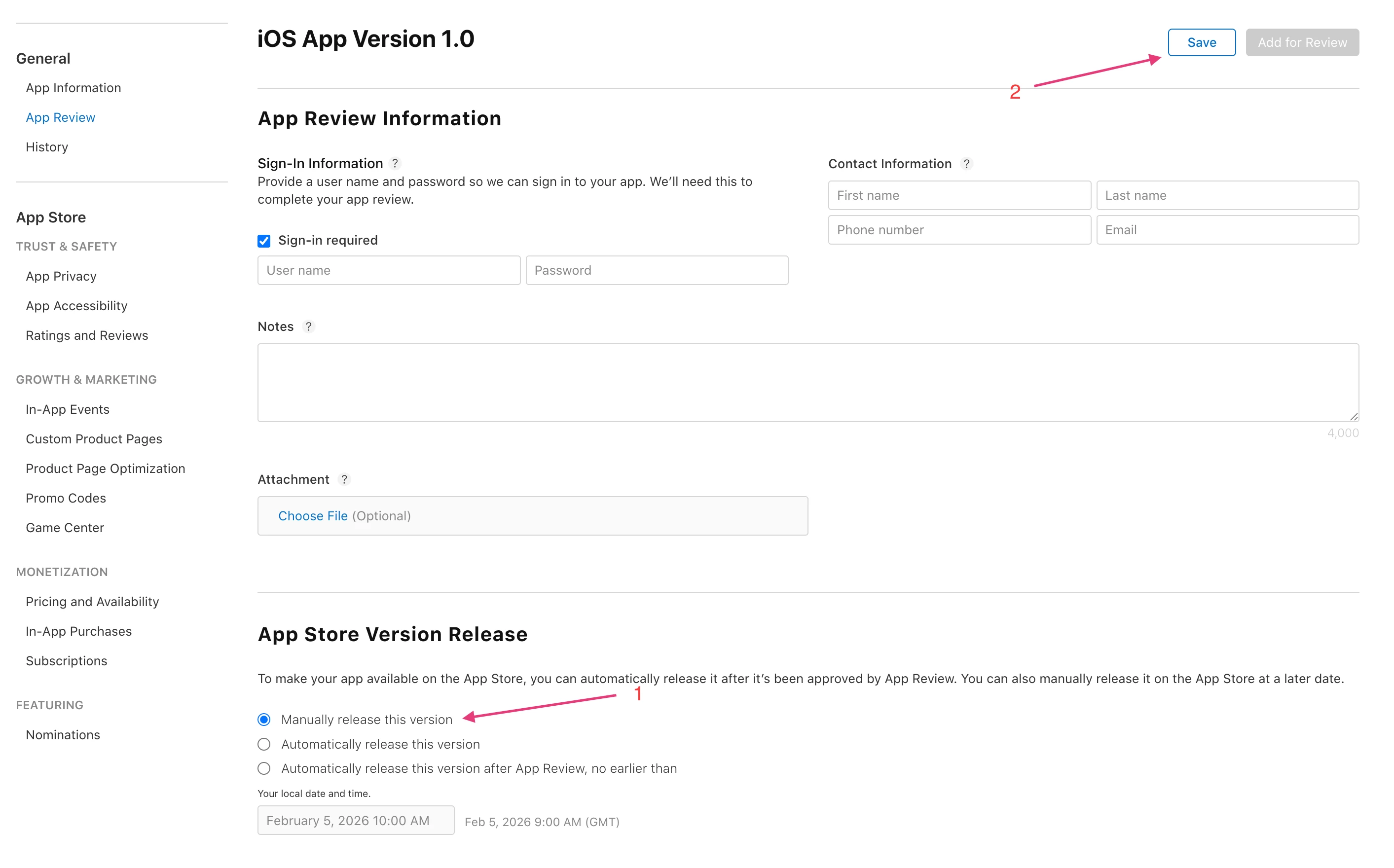
I suggest you also set the app to manually release this version, this way you can disable targeting and make your new production targeting rules / experiments as needed, and only then release:


Then you should be all set. 🙂


Best regards,

Tarek, Developer Support Engineer at RevenueCat


Forum|alt.badge.img+3

Thank you for the detailed response with screenshots Tarek! Super helpful.

Couple follow-up questions

  1. What should I mention in the instructions for the new version release to increase the likelihood of Apple reviewer approving our version with the new subscription groups?
  2. How would we release with multiple new subscription groups? Say we wanted to test 2 new prices, so that would be subscription group B and subscription group C. How would we allow Apple to see both subscription groups? Filtering only by app version wouldn’t work here, right?

Tarek
RevenueCat Staff
Forum|alt.badge.img+1
  • RevenueCat Staff
  • February 5, 2026

Hey,


Happy to help Andrew 🙂


What should I mention in the instructions for the new version release to increase the likelihood of Apple reviewer approving our version with the new subscription groups?


I suggest just being honest and explaining things like they are. Transparency is usually appreciated.


How would we release with multiple new subscription groups? Say we wanted to test 2 new prices, so that would be subscription group B and subscription group C. How would we allow Apple to see both subscription groups? Filtering only by app version wouldn’t work here, right?


One way to do it would be releasing new groups with a new app version.

Otherwise you would need to find a way to display multiple paywalls and communicate that to app review. For instance you could fetch all offerings and show different paywalls with a hidden gesture that you communicate with app review. But unfortunately I can't guarantee this will result in an approved submission.


Best regards,


