Answer

Yearly discount text

  • July 14, 2025
  • 2 replies
  • 81 views

Forum|alt.badge.img+2

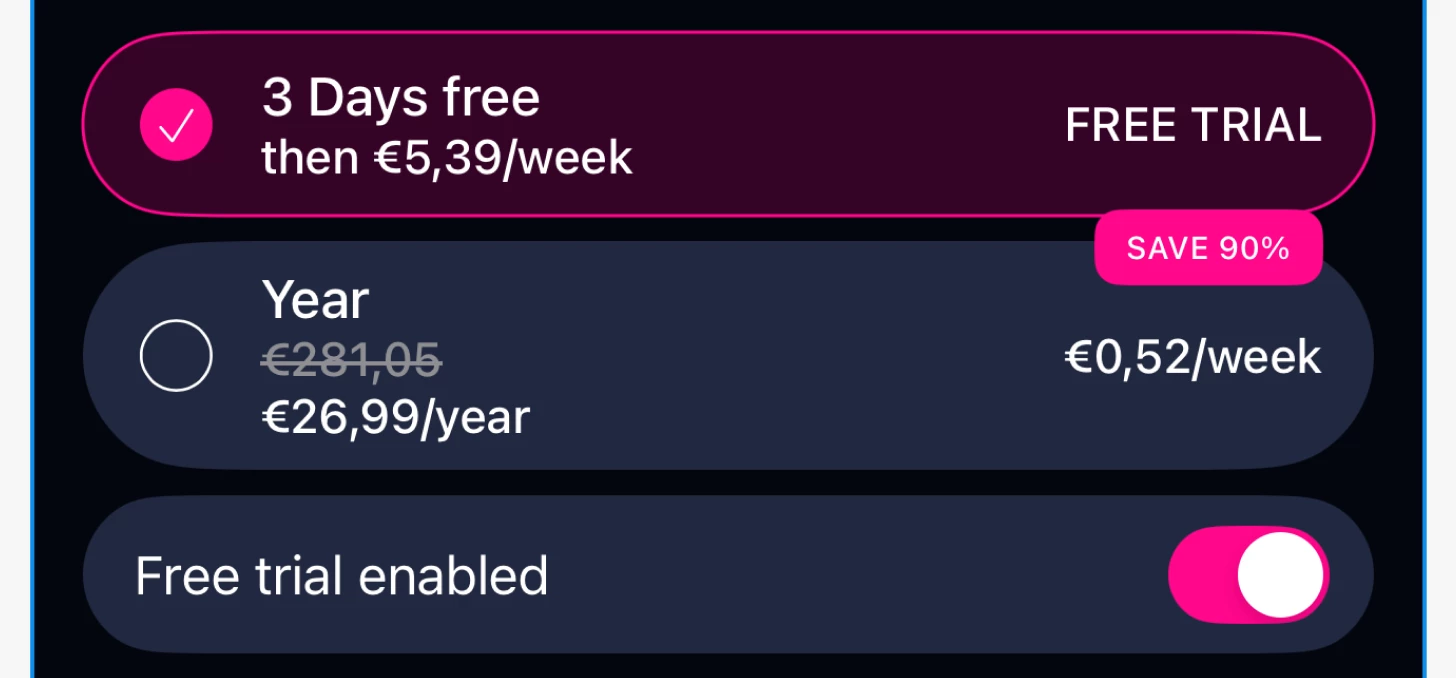
Perhaps this is already answered, couldn’t find it. It’s my first time I’m setting up a paywall for the app, and I very often see how people are designing yearly payment for example:

How do I get the striped out yearly price tag? I can’t figure out is that whole sum created somehow with in App Store subscription and in RevenueCat paywall editor it’s received through variable or is it hardcoded? 

Thanks in advance.

Best answer by guilherme

Hey ​@Sangsom ,

The strikethrough price (e.g €281,05) and “SAVE 90%” badge in that example are not dynamic, so they need to be hardcoded.

Currently, RevenueCat Paywalls only support built-in variables like:

  • {{ product.price_per_period }} → for the actual setup Store price (e.g. €26,99/year)

  • {{ product.relative_discount }} → for percent savings (only if there’s a more expensive package on the same paywall - more here)

In your implementation, you’d have to:

  • Hardcode the ~~€281,05~~ strikethrough price using Markdown (an option on the editor)

  • Hardcode the “SAVE 90%” badge

  • Use {{ product.price_per_period }} for the real, store-synced price

RevenueCat doesn’t expose an “original price” variable or support custom logic in paywall variables.

Docs: Paywall Variables

The team is actively working to make the Paywall Editor and its components more dynamic, so improvements like this are part of our ongoing efforts.

Best,

This post has been closed for comments

2 replies

guilherme
RevenueCat Staff
Forum|alt.badge.img+6
  • RevenueCat Staff
  • Answer
  • July 17, 2025

Hey ​@Sangsom ,

The strikethrough price (e.g €281,05) and “SAVE 90%” badge in that example are not dynamic, so they need to be hardcoded.

Currently, RevenueCat Paywalls only support built-in variables like:

  • {{ product.price_per_period }} → for the actual setup Store price (e.g. €26,99/year)

  • {{ product.relative_discount }} → for percent savings (only if there’s a more expensive package on the same paywall - more here)

In your implementation, you’d have to:

  • Hardcode the ~~€281,05~~ strikethrough price using Markdown (an option on the editor)

  • Hardcode the “SAVE 90%” badge

  • Use {{ product.price_per_period }} for the real, store-synced price

RevenueCat doesn’t expose an “original price” variable or support custom logic in paywall variables.

Docs: Paywall Variables

The team is actively working to make the Paywall Editor and its components more dynamic, so improvements like this are part of our ongoing efforts.

Best,


Forum|alt.badge.img+2
  • Author
  • New Member
  • July 18, 2025

Thank you very much for the answer. 

Took me quite a lot of time with this, to understand what’s really happening :)