
Question

WebSDK checkout form styling

  • December 20, 2024
  • 3 replies
  • 84 views

Forum|alt.badge.img+1

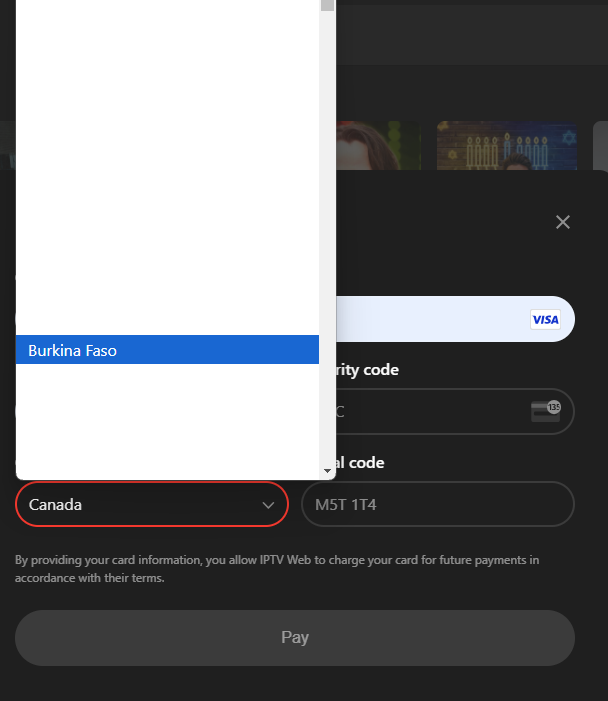
Is there a way to change the styling for the WebSDK checkout form fields? I know we can update the general styling for the form but it is causing some UI issues:

The select field for country styling looks like this:


Also, on prefilling the card details in the browser, it looks like this:
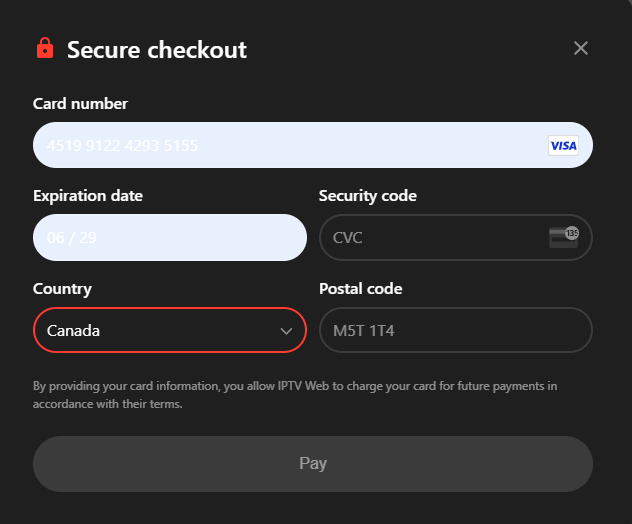


I tried overriding the css variables but no use. Is there any way to control this?

This post has been closed for comments

3 replies

Forum|alt.badge.img+1
  • RevenueCat Staff
  • December 20, 2024

Hi ​@hrithvik123
Could you please tell me the browser and the operative system you were using when you encountered this issue?
If possible, could you share the link where I can test it?

Thanks and sorry for any inconvenience this might have caused.


Forum|alt.badge.img+1
  • RevenueCat Staff
  • December 20, 2024

Hi ​@hrithvik123 we were able to reproduce the issue.

We just released version 0.15.1 that should fix the problem, could you try to update and double check on your side?


Forum|alt.badge.img+1
  • Author
  • New Member
  • December 21, 2024

@Nicola Thank you, that fixed the problem.